Does your 6-year-old child have an interest in Science or Mathematics? Do they wonder how people design aesthetic websites or develop interactive games? Is your preadolescent not coding-savvy, but they want to learn? If the answer to these questions is ‘’Yes’’, then this blog is for you! It will help you know the introductory activities to engage in before learning the basics of coding for youngsters.
Take a look at some of these introductory activities that will prepare your kid to become a coder:
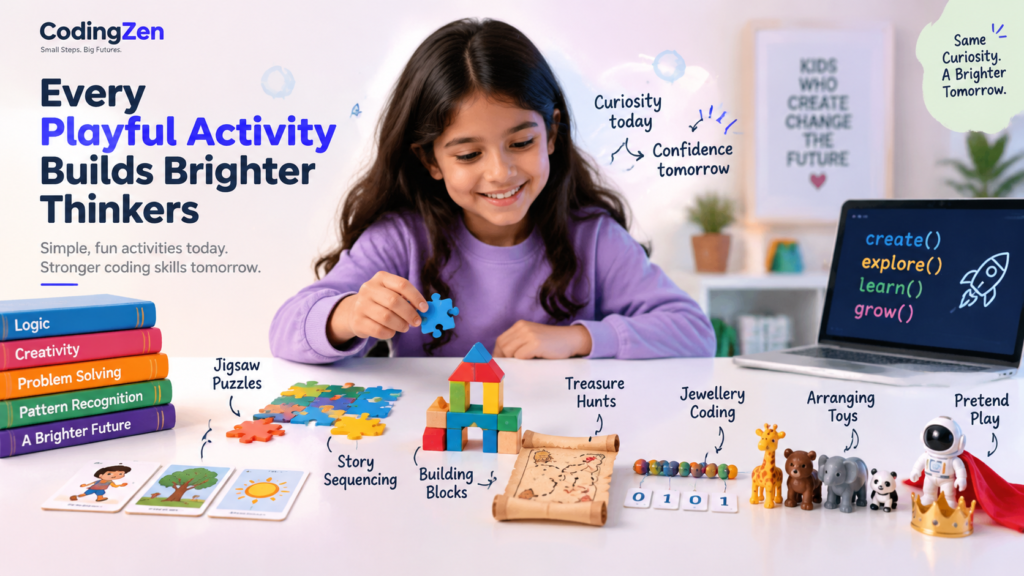
Jigsaw Puzzles
In a jigsaw puzzle, your child should combine many pieces to create a specific image. Hence, kids learn how to put relevant pieces together to achieve a common goal, just like what is required in coding.
Story Sequencing
When a story is created, multiple events take place, one after the other. Therefore, one of the activities that can help kids learn about the sequence in which codes are to be written is story sequencing.
One way in which story sequencing can take place is through flash cards. For example, different activities characters perform can be created on cards, and then kids can be asked to place the cards one after the other.
Pattern Sequencing
A pattern refers to a sequence of designs created in a specific fashion. For instance, when a pattern is to be made, the first design may have a flower on the top right corner, the second design may have a flower on the top left corner, and the third design may have a flower on the bottom of the design. The next designs may be in the same order: the fourth design may have the flower on the top right corner, the fifth design may have the design on the top left corner, and so on.
Building Blocks
When kids learn to code, they also need to test their imaginative and creative skills. For example, when kids create an interactive game, they need to determine the code and the entire plot, characters, game objective, game flow, sounds, visuals, and animations. Hence, kids need to learn about building blocks to improve their creativity skills from a young age.
Building blocks come in different colours or shapes, and kids learn how to put together the blocks to make various creations. For example, kids can learn how to create a house, park, window, etc., by arranging the blocks in a specific manner.
Treasure Hunts
In a treasure hunt, a kid must first read a specific cue and then discover a piece of paper using the cue. Then, the kid has to discover the next cue based on the information written on the piece of paper, and so on, until the kid discovers the treasure by using the final piece of paper.
If you want to help your kid solve the treasure hunts in an even more interesting way, you can do so by using numbers or special characters in place of words. The kid can be handed the word corresponding to each number or special character at the start of the game, and the child will decode the numbers and characters accordingly. Your child will easily learn about decoding through this game.
By participating in a treasure hunt activity, the kid learns how to follow a set of instructions before writing a particular code. For example, if an individual wants a business website designed in a specific layout, the kid can follow the instructions and develop the website accordingly.
Jewellery Coding
Many 6-year-olds experiment with beads at a young age and create necklaces made with beads. When jewellery making combines with binary numbers, it prepares kids to learn coding.
In jewellery coding, one uses the binary numbers 0 and 1. Then, different combinations of the numbers 0 and 1 correspond to different letters. Once this is determined, a person’s name or any other message can be written using the beads. For example, your kid can use two beads of varying colours, like yellow and green, and one colour can correspond to 0, whereas the other colour can correspond to 1.
Lining Up/Arranging Toys
Developing a game, website, etc., requires aligning code in a certain way to execute the code and complete a project like developing a website or a game. Kids can prepare themselves to learn how to sequence code by learning how to line up/arrange toys. Kids can arrange the toys in a specified way, like in ascending or descending order. (based on the size of the toy). Similarly, you can ask your kid to sort toys according to their colours. Let’s take the example of a kid with brown and white teddy bears. Here, you can ask the kid to put the brown teddy bears together in one line and the white teddy bears together in another line.
A more complex version of the arranging toys activity is to arrange toys based on specific cues. For example, kids may be asked to ‘interchange the positions of the third and the first toy, change the position of the second toy and make it the sixth toy,’’ and so on. Again, this activity will develop your kid’s logical thinking abilities.
Pretend Play
Your preadolescent may believe that role-playing exercises are interesting. Here, you can provide your kid with many objects like spoons, cloth, toys, etc., and ask your kid to create a story using the props. This activity will boost your child’s logical thinking capabilities.
Coding for youngsters becomes simple if they engage in any of the above introductory activities before learning basic coding for kids. If you want to help your kid learn a new skill, enrol your child in coding classes. These classes help your kid develop logical thinking skills, solve problems, and bring creative ideas to life with games, functional websites, etc.
Did you enjoy reading this blog? Then, you can also check out our blog, ‘’How to discover the best coding program for your kids.’’