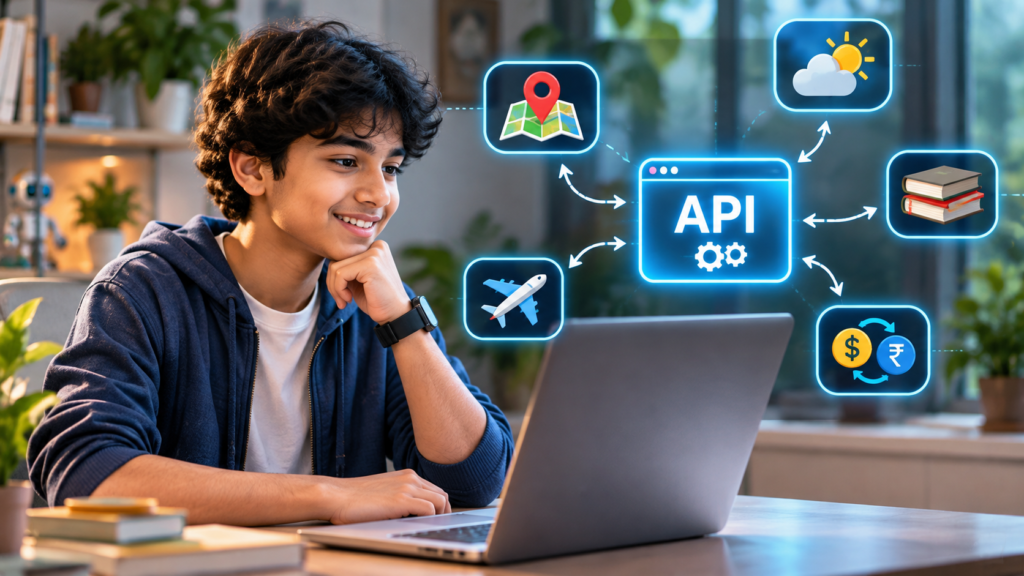
Your child opens a weather app and instantly sees the temperature in another city.
A travel website displays available flights. A sports application updates match scores. A map shows the location of a nearby restaurant.
But how do these applications access information they may not store themselves?
Often, the answer involves something called an API.
Understanding APIs for kids introduces an interesting side of programming that goes beyond writing instructions on a screen. It helps students discover how different software systems communicate, exchange information, and work together.
For children who already enjoy building websites, games, or simple applications, learning about APIs can be an exciting next step.
What Is an API? A Simple Explanation for Kids
API stands for Application Programming Interface.
In simple terms, an API is a defined way for one software application to communicate with another.
Imagine visiting a restaurant.
You choose something from the menu and place your order with a waiter. The waiter communicates your request to the kitchen and brings back the prepared food.
You don’t need to enter the kitchen or understand every step of the cooking process.
An API works in a somewhat similar way.
One application sends a request through an API. Another system processes that request and sends back an appropriate response.
The requesting application can then use the returned information.
This explanation is simplified, but it introduces an important principle: software systems can interact without needing direct access to each other’s internal workings.
How Do APIs Work in Everyday Applications?
Children encounter the results of API interactions regularly, even if they don’t recognise them.
Consider a simple weather application.
When someone searches for the temperature in Singapore, the application may request weather information from a separate weather data provider.
The process generally involves four stages:
- Request: The application asks for specific information.
- Communication: The request reaches the appropriate API endpoint.
- Response: The system returns data or an error message.
- Display: The application processes the response and presents useful information.
For example, an API might return a temperature value and weather conditions.
The application decides how to display those details to the user.
This distinction helps students understand that the information source and the user interface can be separate parts of a digital product.
Why Should Students Understand APIs?
Learning about APIs is not necessary for every young coding beginner.
However, once students become comfortable with basic programming concepts, APIs can help them understand how more complex applications are organised.
Understanding How Digital Products Connect
Many modern applications combine information or services from multiple systems.
A shopping website, for example, might communicate with separate systems for product information, payments, or order management.
Understanding APIs helps teenagers recognise how software components can work together.
Moving Beyond Standalone Projects
Beginner projects often rely on information entered directly into a program.
An API-based project introduces the possibility of using information supplied by another system.
This creates opportunities to explore applications that respond to changing data.
Learning to Work With Structured Information
API responses commonly use formats such as JSON.
JSON organises information using names and values.
For example, a weather response might contain:
{
  "city": "Singapore",
  "temperature": 29,
  "unit": "C"
}
This is an illustrative example, not live weather data.
Students can practise identifying information, extracting relevant values, and presenting them clearly.
These activities connect programming concepts with practical data handling.
At What Age Can Children Start Learning APIs?
The right time depends more on programming experience than age alone.
Ages 5 to 9: Understanding Connected Technology
Younger children do not need to begin with API requests or technical documentation.
Instead, parents and educators can introduce basic questions:
- Where does a weather app get its information?
- How does a website show changing information?
- Why might an application need an internet connection?
These conversations help children recognise that digital tools often depend on connected services.
Ages 10 to 13: Exploring Simple Data Connections
Students familiar with variables, functions, and basic programming logic may begin exploring structured information.
They can learn how requests and responses work through guided examples.
At this stage, the emphasis should remain on understanding the concept rather than memorising technical terminology.
Ages 14 to 18: Building API-Based Applications
Teenagers with foundational programming experience can explore API requests using languages such as Python or JavaScript.
They may begin working with JSON responses, error handling, and API documentation.
These concepts become particularly relevant for students interested in web development, software applications, and data-driven projects.
Three Beginner API Project Ideas for Teenagers
Practical experimentation can make API concepts easier to understand.
1. Build a Country Information Explorer
Students can create an application that displays information about different countries using a suitable public data API.
The project might organise country names, capitals, languages, or other available information.
It introduces data retrieval, selection, and presentation.
2. Create a Currency Information Dashboard
A beginner dashboard could retrieve exchange-rate information from an appropriate data provider.
Students can explore how applications handle numerical data and different currency selections.
It is important to explain that exchange-rate information can change and may not reflect the rates offered by banks or payment providers.
3. Develop a Book Search Application
Students interested in reading can explore a book-information API.
A simple application might let users search for a title and display available book details.
This introduces search requests, responses containing multiple results, and handling missing information.
Before beginning any project, students should review the provider’s access requirements, usage limits, and data policies with appropriate guidance.
What Should Children Learn Before API Programming?
API programming becomes more manageable when students already understand a few foundational concepts.
These include variables, functions, conditional statements, basic data structures, and how information moves through a program.
Students should also understand that external services can return errors, incomplete responses, or unexpected information.
Another important consideration is responsible data use.
API keys and other credentials should not be exposed in publicly shared code. Young learners should use appropriately selected services and follow provider rules with guidance.
A structured learning progression helps students understand what their applications are doing rather than simply copying code.
How CodingZen Approaches Real-World Programming Concepts
At CodingZen, coding education is centred on helping children understand technology through practical, project-based learning.
As students develop foundational programming skills, they can begin exploring how different technologies connect.
Concepts such as APIs provide useful opportunities to understand the relationship between code, information, and the applications people use every day.
Rather than treating programming as a collection of commands to memorise, CodingZen emphasises experimentation, logical understanding, and creating meaningful projects.
The goal is to help young learners become more confident in understanding how technology works and how they can build with it.
Conclusion: APIs Help Children Understand the Bigger Picture of Programming
Learning APIs for kids opens the door to understanding how connected digital applications work.
From weather information to book searches, APIs demonstrate how software can request, receive, and use information from other systems.
For younger learners, the journey can begin with simple conversations about connected technology.
For teenagers with programming experience, API-based projects offer opportunities to explore web development, structured data, and application design.
At CodingZen, we encourage children to progress from understanding programming fundamentals to creating practical technology projects.
Explore CodingZen’s online coding education programmes to help your child develop programming knowledge through hands-on learning and guided exploration.
Frequently Asked Questions
1. What is an API in simple words for kids?
An API, or Application Programming Interface, is a way for software applications to communicate. It allows one program to request information or functionality from another system through defined rules.
2. Is API programming difficult for beginners?
API programming can seem complicated initially, but students who understand variables, functions, and basic programming logic can begin with simple guided examples. The difficulty depends on the API and the project requirements.
3. Can children learn APIs using Python?
Yes. Python can be used to send API requests, process responses, and build applications using external information. Beginners should first understand basic Python programming and data structures.
4. What is the difference between an API and a website?
A website typically provides an interface that people interact with through a browser. An API provides a defined interface that software uses to request information or services. A website and an API can also be parts of the same system.
5. Are APIs safe for children to use?
APIs can be appropriate learning tools when chosen carefully. Parents and educators should review provider policies, access requirements, privacy considerations, and age suitability. Students should also learn to protect API credentials and avoid sharing personal information unnecessarily.