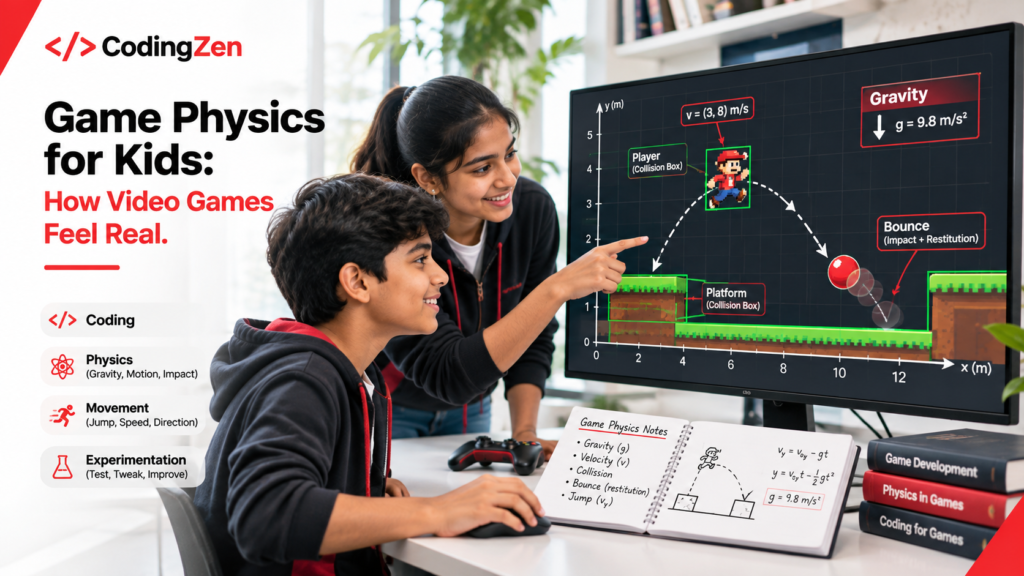
A character jumps across a platform, lands on the ground, and continues running.
It looks effortless.
But behind that simple movement, a game is performing calculations that determine how high the character jumps, how quickly it falls, and exactly when its feet touch the platform.
These movements are not accidental. They are created through programming and mathematical rules.
Understanding game physics for kids introduces an interesting connection between gaming, coding, and real-world science.
For children who enjoy playing video games, discovering how movement works behind the screen can make game development an engaging learning experience.
Instead of simply controlling a character, students begin understanding the rules that make the character respond.
What Is Game Physics for Kids?
Game physics refers to the mathematical rules and programming systems that simulate movement and physical interactions inside video games.
In real life, objects respond to forces such as gravity and friction.
Video games recreate selected aspects of these behaviours using calculations.
For example, a game might need to determine:
- How quickly a ball moves after being kicked.
- When a character should stop falling.
- What happens when two objects collide.
- How a vehicle responds when it turns.
- Whether an object should bounce or remain still.
These behaviours are controlled through programming.
However, game physics does not always need to imitate reality perfectly.
A superhero might jump unusually high. A racing car might turn more sharply than a real vehicle.
Developers adjust physical rules to create the experience they want players to have.
How Does Gravity Work in Video Games?
Gravity is one of the most recognisable concepts in game physics.
When a character jumps, it initially moves upward, slows down, and eventually begins falling.
In many games, this effect is created by changing the character’s vertical velocity over time.
Velocity describes how quickly an object moves and in which direction.
Gravity changes that velocity, causing the character to accelerate downward.
A Simple Example of Coding Gravity
Imagine a game character standing on a platform.
When the player presses the jump button, the program gives the character an upward velocity.
During each update, simulated gravity reduces that upward movement and eventually makes the character fall.
The game then checks whether the character has reached the ground.
If the character lands, the program stops its downward movement.
This sequence introduces students to variables, calculations, conditional statements, and continuous updates.
It also demonstrates how a concept learned in science can be represented through code.
Understanding Collision Detection in Games
Imagine playing a racing game where cars pass straight through walls.
Or a platform game where the main character falls through the floor.
These situations would make the game difficult to play as intended.
Collision detection helps developers identify when objects touch or overlap.
How Do Games Know When Objects Collide?
Games often use simplified shapes to detect interactions.
A character might be surrounded by an invisible rectangle, while a ball might use an invisible circle.
The program checks whether these shapes intersect.
If they do, the game decides what should happen next.
For example:
- A ball might bounce after touching a wall.
- A player might stop moving when reaching a barrier.
- A coin might disappear when collected.
- A character might lose health after touching an obstacle.
The collision itself does not automatically determine the outcome.
Developers must program the appropriate response.
This distinction helps young learners understand the relationship between detecting an event and deciding how software should respond.
Why Video Game Physics Is Not Always Realistic
Some games intentionally use exaggerated movement.
A character might change direction while jumping. A vehicle might survive an enormous fall. A ball might bounce much higher than expected.
These behaviours would be unusual in real life, but they may make a game more enjoyable.
Game designers balance realism with responsiveness, difficulty, and player expectations.
For example, a platform game might allow a player to jump again shortly after stepping off an edge.
This technique can make controls feel more forgiving.
It demonstrates an important aspect of game development: programming decisions are often influenced by how people experience the game.
Students can therefore explore not only whether a movement calculation works, but also whether it produces enjoyable gameplay.
How Game Physics Connects Coding With Mathematics
Game physics offers practical opportunities to use mathematical concepts.
Coordinates and Position
Games use coordinates to represent where objects appear.
In a two-dimensional game, an object’s position is commonly described using horizontal and vertical values.
Changing these coordinates moves the object across the screen.
Speed and Velocity
Speed describes how quickly something moves.
Velocity also includes direction.
Students can experiment with different movement values and observe how a character behaves.
Angles and Direction
Angles help determine how objects rotate or move.
For example, a game involving projectiles may use angles to calculate the direction of movement.
Time and Motion
Games repeatedly update object positions.
Students can explore why movement calculations often account for elapsed time rather than assuming every screen update takes exactly the same duration.
These concepts make mathematical ideas relevant to something students can observe and interact with.
At What Age Can Children Explore Game Physics?
The complexity of game physics should match a child’s programming experience.
Ages 5 to 9: Exploring Cause and Effect
Younger children can begin by observing how objects move in simple games.
They might explore questions such as why a ball bounces or what happens when a character reaches an obstacle.
Visual programming environments can introduce movement and collision concepts without requiring advanced mathematics.
Ages 10 to 13: Creating Basic Movement Rules
Students with introductory programming knowledge can begin experimenting with coordinates, speed, and simple jumping behaviour.
They may also explore how objects interact with walls and platforms.
At this stage, visual demonstrations often make mathematical relationships easier to understand.
Ages 14 to 18: Understanding Physics Through Code
Teenagers with stronger programming foundations can explore acceleration, velocity, collision responses, and more sophisticated simulations.
Depending on their experience, they may work with Python, JavaScript, or suitable game development tools.
The objective is to gradually connect programming concepts with observable movement.
How Parents Can Encourage Learning Through Game Design
Parents do not need to understand physics engines to support their child’s interest.
A useful starting point is encouraging children to observe games more carefully.
Instead of asking only whether a game is fun, discuss how particular movements might have been created.
Why does one character jump higher than another?
How does a racing game know when a car hits a barrier?
What makes a bouncing ball gradually lose height in some games?
These questions can encourage children to look beneath the visual experience.
Parents can also invite children to explain the rules behind something they have created.
Describing how a feature works provides an opportunity to organise technical ideas and identify gaps in understanding.
Learning Game Development Through Practical Coding at CodingZen
At CodingZen, we believe children learn technology more meaningfully when they can experiment with concepts and apply them to practical projects.
Game development provides opportunities to explore programming logic, mathematics, creativity, and interactive design together.
Students can gradually understand how instructions influence the behaviour of objects, characters, and digital environments.
Rather than treating a game as something that simply appears on a screen, project-based learning encourages children to explore how its individual components are created.
This reflects CodingZen’s wider approach to helping students aged 5–18 develop programming knowledge through hands-on learning and experimentation.
Conclusion: Game Physics Makes Coding More Tangible
Understanding game physics for kids helps young learners recognise the programming principles behind familiar gaming experiences.
Gravity, velocity, collision detection, and movement calculations demonstrate how mathematical ideas can become interactive digital systems.
For younger children, the learning experience may begin with observing movement and exploring simple cause-and-effect relationships.
Older students can progress towards programming movement rules and experimenting with more complex simulations.
The goal is not necessarily to create realistic games immediately.
It is to understand how mathematical rules and programming decisions work together to produce believable, responsive experiences.
Interested in helping your child explore game development?
Discover CodingZen’s online coding education programmes and learn how practical, project-based activities can introduce children to programming, game mechanics, and digital creation.
Frequently Asked Questions
1. What is game physics in simple terms?
Game physics refers to the programming and mathematical calculations used to simulate movement and interactions in video games. It helps determine how characters jump, objects fall, vehicles move, and collisions occur.
2. Do children need to know advanced mathematics to learn game physics?
No. Beginners can explore basic movement using coordinates, simple calculations, and visual programming. More advanced concepts such as acceleration, angles, and physics simulations can be introduced as students develop their mathematical understanding.
3. Which programming languages are used for game physics?
Game physics can be implemented using several programming languages, including C++, C#, Python, and JavaScript. The appropriate language depends on the game engine, development environment, and complexity of the project.
4. What is collision detection in game development?
Collision detection is the process of determining whether two game objects touch or overlap. Developers use this information to trigger responses such as bouncing, stopping movement, collecting objects, or activating game events.
5. Can learning game physics help children understand coding?
Game physics provides practical examples of programming concepts such as variables, conditions, calculations, and repeated updates. By experimenting with movement rules, students can observe how changes in code affect a game’s behaviour.