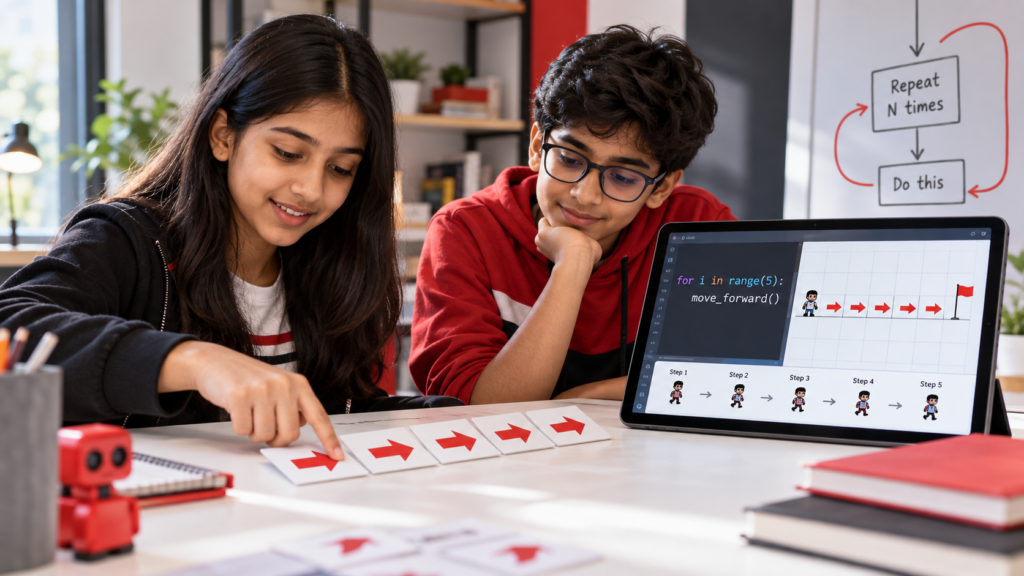
Imagine asking your child to write the sentence “I will practise coding” twenty times. They could write it manually, but what if a computer could complete the same task using just a few instructions?
That is exactly what loops make possible in programming.
Understanding loops in programming for kids is an important step towards writing shorter, more organised and efficient code. Instead of repeating the same instruction again and again, children learn to tell a computer how many times an action should happen or when it should stop.
Loops appear in everything from simple animations to games, websites and software applications. Learning how they work helps young programmers move beyond individual commands and begin controlling how their programs behave.
What Are Loops in Programming for Kids?
A loop is a programming structure that repeats a set of instructions based on a specified number of repetitions or a condition.
For example, imagine a child wants a character in a game to jump five times.
Without a loop, they might write the jump instruction five separate times.
With a loop, they can write the instruction once and tell the computer to repeat it five times.
This process is called iteration.
Loops help programmers avoid unnecessary repetition, organise instructions and make programs easier to modify.
For beginners, the most important idea is simple: a loop tells a computer to repeat an action according to a rule.
Why Do Programmers Use Loops?
Computers are designed to follow instructions precisely, even when those instructions involve repeating the same task thousands of times.
Consider a game where a character collects coins. Each time the character collects a coin, the program might need to update the score and check whether a target has been reached.
Rather than writing separate instructions for every possible coin, programmers can use repetition and conditions to manage recurring actions.
Loops are commonly used for:
- Displaying repeated messages or patterns
- Processing items in a collection
- Updating objects in games
- Performing calculations
- Repeating actions while a condition remains true
The purpose is not simply to reduce the number of lines of code. Loops also allow programs to handle changing information without requiring programmers to predict every individual action.
Understanding the Two Main Types of Coding Loops
As children progress into text-based programming, they will encounter different ways of controlling repetition.
Two commonly used structures are for loops and while loops.
1. For Loops: Repeating an Action a Specific Number of Times
A for loop is useful when a program needs to repeat an action over a sequence of values.
Consider this Python example:
for number in range(5):
    print("Hello!")
The program displays:
Hello!
Hello!
Hello!
Hello!
Hello!
The instruction range(5) generates five values, beginning at zero.
The loop runs once for each value, printing the same message five times.
Now imagine changing range(5) to range(10).
The program prints the message ten times without needing ten separate print instructions.
This introduces an important programming concept: changing one instruction can control repeated behaviour throughout a program.
2. While Loops: Repeating Until a Condition Changes
A while loop works differently.
Instead of iterating through a predefined sequence, it continues repeating instructions while a condition remains true.
Consider this example:
count = 1

while count <= 5:
    print(count)
    count = count + 1
The program prints the numbers 1 through 5.
Here is what happens:
The program starts with count equal to 1.
It checks whether the value is less than or equal to 5.
If the condition is true, it prints the number and increases the count.
The process repeats until the condition becomes false.
This makes while loops useful for situations where repetition depends on a changing condition.
For Loop vs While Loop: What Is the Difference?
Both loops repeat instructions, but their controlling rules differ.
| For Loop | While Loop |
|---|---|
| Iterates through a sequence or collection | Repeats while a condition is true |
| Useful for processing a known sequence of values | Useful when stopping depends on a condition |
| Example: Print five messages | Example: Count until a limit is reached |
| Often convenient for counted repetition | Requires careful management of the stopping condition |
Neither loop is universally better.
Children should learn to choose the structure that makes the program’s behaviour easiest to understand.
How to Explain Programming Loops Using Everyday Examples
Children often understand abstract programming concepts more easily when they can connect them to familiar routines.
Repeating an Exercise
Imagine an instructor asking a child to perform ten jumping jacks.
The instruction contains two parts: the action and the number of repetitions.
This resembles a counted loop.
Filling a Water Bottle
Imagine filling a bottle until it reaches a marked level.
The action continues while the bottle is below the mark.
This resembles a condition-controlled loop.
Checking Items on a List
Suppose a child checks every item on a school packing list.
The same action is applied to each item until the list has been processed.
This is similar to using a loop to work through a collection of data.
These comparisons provide a starting point. Children can then translate the underlying idea into programming instructions.
Common Mistakes Children Make When Learning Loops
Loops are straightforward in principle, but beginners may encounter difficulties when writing them.
Forgetting to Update a Variable
In a while loop, a condition must eventually become false if the loop is supposed to finish.
If a child forgets to update the counting variable, the program may continue repeating indefinitely.
This is called an infinite loop.
Misunderstanding Range Values
Python’s range(5) produces the values 0, 1, 2, 3 and 4.
Children sometimes expect it to produce numbers from 1 through 5.
Understanding where a sequence begins and ends helps prevent unexpected results.
Incorrect Indentation
Python uses indentation to identify which instructions belong inside a loop.
If a command is placed at the wrong indentation level, the program may behave differently or display an error.
A helpful learning habit is to predict what a loop will produce before running the program.
How Parents Can Help Children Understand Loops
Parents do not need programming experience to reinforce the concept of repetition.
Start by asking children to describe the action being repeated and the rule that controls it.
For example:
“What should happen each time the loop runs?”
“How many times should this instruction repeat?”
“What needs to change for the loop to stop?”
Encourage children to trace the values of variables on paper before testing their code.
For a counting loop, they can record each value and explain why the next repetition does or does not happen.
This helps connect the written instructions with the program’s actual behaviour.
How CodingZen Introduces Practical Programming Concepts
Learning programming syntax is useful, but children also need opportunities to understand why particular instructions are used.
At CodingZen, hands-on, project-based coding education gives students opportunities to explore programming concepts through practical applications.
Loops can be introduced through activities involving repeated movements, patterns, calculations or interactive programs.
As learners develop greater familiarity with programming, they can explore how loops interact with variables, conditions and other instructions.
Structured learning helps children progress from recognising repeated actions to selecting and writing appropriate loop structures independently.
The objective is to understand not only how to write a loop, but also when and why it is useful.
Conclusion: Learning to Control Repetition in Code
Understanding loops in programming for kids helps children recognise how computers perform repeated tasks without requiring every instruction to be written separately.
From basic counted repetition to condition-controlled processes, loops introduce important ideas about sequences, variables and program behaviour.
Children can begin with familiar examples, experiment with simple Python instructions and gradually apply loops to more complex programs.
With regular practice and appropriate guidance, they can develop a clearer understanding of how repetition contributes to programming.
If your child is interested in learning coding fundamentals through practical activities, explore CodingZen’s online coding courses for kids and teenagers. Discover learning opportunities that encourage experimentation, logical reasoning and hands-on programming.
Frequently Asked Questions
1. What is a loop in coding for kids?
A loop is a programming structure that repeats instructions according to a rule. It allows children to perform repeated actions without writing the same command multiple times.
2. What is the easiest way to explain loops to a child?
Use familiar examples such as repeating an exercise ten times or checking every item on a list. These activities demonstrate how an action can be repeated using a clear instruction.
3. What is the difference between a for loop and a while loop?
A for loop iterates through values in a sequence or collection. A while loop continues running as long as its condition remains true.
4. What is an infinite loop in programming?
An infinite loop occurs when instructions continue repeating without reaching a stopping point. It can happen accidentally when a condition never becomes false, although some programs deliberately use ongoing loops.
5. Should children learn loops before creating coding projects?
Children can learn loops while building simple programs. They do not need to master every programming concept beforehand. Small practical examples help them understand how repetition works and where it can be applied.