Your child probably visits dozens of websites every week. But have they ever wondered what makes a website work?
Why does a button change colour when someone clicks it? How does a website arrange pictures and text? What makes an online quiz respond when an answer is selected?
Behind these everyday experiences are technologies that children can learn to understand and use themselves.
HTML, CSS and JavaScript for kids offer a practical introduction to website development. Instead of simply exploring websites created by others, children can discover how to design pages, organise information and add interactive features.
For parents considering web development for kids, understanding what these three technologies do is a useful starting point.
What Are HTML, CSS and JavaScript?
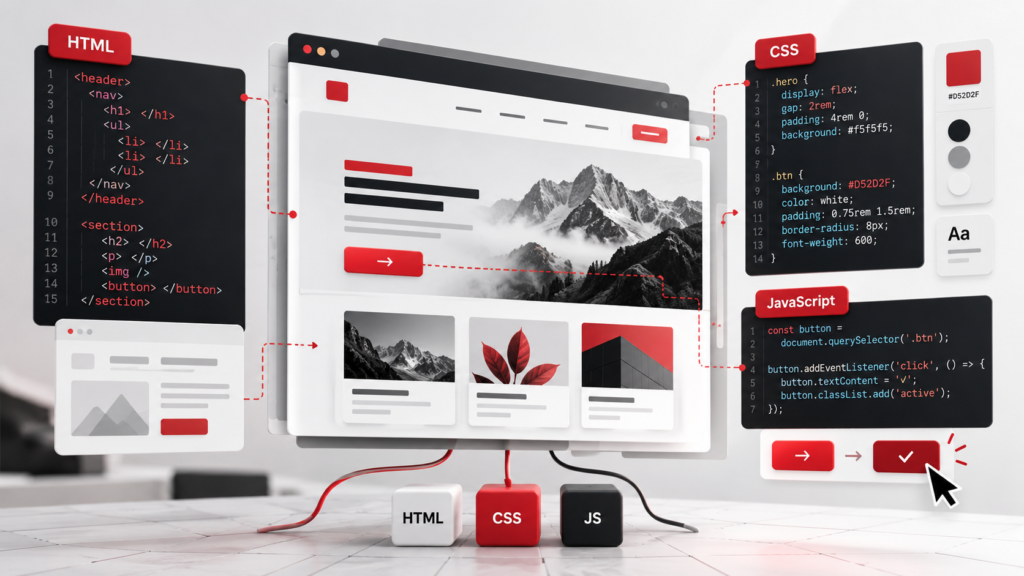
HTML, CSS and JavaScript are three foundational technologies used in building websites. Although they work together, each has a different responsibility.
Consider a website for a school science exhibition.
HTML: Creating the Website’s Structure
HTML stands for HyperText Markup Language.
It tells a web browser what information belongs on a page and how that content is organised.
A student could use HTML to add:
- A title introducing the science exhibition
- Headings for different experiments
- Photographs of student projects
- Descriptions of each experiment
- Links to additional resources
HTML gives the page its structure, much like arranging chapters, headings and photographs in a book.
CSS: Making the Website Look Appealing
CSS stands for Cascading Style Sheets.
Once the content is organised, CSS controls its visual presentation.
A child could use CSS to give the exhibition website a green background, adjust the spacing between photographs or create different styles for headings.
CSS also helps developers create layouts that adapt to different screen sizes.
This introduces an important idea: designing something digitally involves thinking about how people will experience it.
JavaScript: Making the Website Interactive
JavaScript is a programming language that adds interactive behaviour to websites.
Imagine the science exhibition website includes a button labelled “Reveal the Answer.”
With JavaScript, a student can make that button display the answer to a question when clicked.
Children can gradually explore more complex interactions, including quizzes, image galleries and forms.
Together, HTML provides structure, CSS handles presentation and JavaScript adds interactive functionality.

MDN
+1
Why Is Web Development a Useful Coding Activity for Children?
One appealing aspect of website coding for kids is that students can see many of their changes immediately.
If a child changes a heading, the new text appears in the browser. If they adjust a CSS colour, the page looks different. If a JavaScript button does not respond, they can investigate the instructions controlling it.
This creates opportunities to understand the relationship between written code and visible results.
Children Learn to Organise Information
Building a website involves deciding what information matters and how visitors should find it.
For example, a student creating a website about endangered animals needs to decide which information belongs on the homepage and which details require separate sections.
This encourages planning, categorisation and thoughtful communication.
Design Decisions Become More Meaningful
Children often have strong opinions about colours, photographs and layouts.
Web design provides an opportunity to explore those preferences while considering readability and usability.
A colourful page might look exciting, but is the text easy to read? Can visitors find the information they need?
These questions introduce children to user-centred design.
What Should Kids Learn First: HTML, CSS or JavaScript?
For many beginners, learning HTML before CSS and JavaScript provides a manageable introduction.
Each stage adds a new layer of understanding.
HTML
Stage 1: Build the page
Create headings, paragraphs, images and links.
CSS
Stage 2: Design the page
Experiment with colours, typography, spacing and layout.
JavaScript
Stage 3: Add interactions
Create buttons, simple quizzes and changing content.
This sequence is not a rigid rule. A student with previous programming experience may progress differently.
The important consideration is whether children understand what their code does rather than simply copying instructions.
A Practical Example: Building a Digital Recipe Book
One beginner web development project is a personal recipe website.
Suppose a student wants to create a digital collection of favourite family recipes.
They could begin by using HTML to create a homepage containing recipe names, ingredient lists and preparation instructions.
Next, they could use CSS to create a consistent design, choose readable fonts and arrange recipe photographs.
Once the basic website works, JavaScript could introduce interactive elements.
For instance, a button might switch between metric and alternative ingredient measurements using predefined conversions.
The student now has opportunities to work with content organisation, visual design and simple programming logic.
More importantly, the completed website has a purpose that matters to its creator.
This is where project-based learning becomes particularly useful. Students are not just practising isolated commands. They are using those commands to solve a problem they understand.
Common Challenges Children Face While Learning Website Development
Website development is accessible to beginners, but it still introduces unfamiliar concepts.
Parents may notice their child encountering a few common difficulties.
Expecting Everything to Work Immediately
A student might write CSS instructions but see no visible change.
The issue could be something small, such as an incorrect selector or a missing connection between files.
Rather than immediately providing the correction, parents can encourage children to compare their instructions with the intended result.
Confusing Website Design With Programming
Children may initially believe that changing colours and adding photographs is the same as building interactive functionality.
Understanding the distinction between HTML, CSS and JavaScript helps clarify how different technologies contribute to a working website.
Copying Code Without Understanding It
Following examples is a normal part of learning.
However, students benefit from experimenting with those examples.
If a child copies a JavaScript instruction, ask what they expect to happen if a particular value changes.
Small experiments can reveal whether they understand the underlying concept.
How Parents Can Support Web Development Learning at Home
Parents do not need programming experience to encourage meaningful learning.
A few simple questions can turn a completed website into a useful conversation.
Ask your child:
- Why did you organise the page this way?
- What happens when someone clicks this button?
- How would the website look on a smaller screen?
- Which part did you find most difficult to create?
- What would you improve if someone else were using it?
Parents can also encourage children to show their work to family members and listen to their feedback.
For projects published online, adults should help children avoid sharing personal details, private photographs or identifying information without appropriate permission.
The objective is not to evaluate whether the website looks professionally designed. It is to understand the thinking behind the student’s decisions.
Learning Web Development Through Structured Coding Education
As children progress, website development can introduce more complex topics such as responsive layouts, forms, programming functions and data handling.
Moving from basic pages to functional projects requires gradually connecting new concepts with existing knowledge.
At CodingZen, the emphasis on practical, project-based coding education supports this kind of learning.
Rather than treating programming as a collection of commands to memorise, students can explore how different concepts contribute to something they are creating.
For families interested in online coding education, this approach offers a way to connect technical learning with practical experimentation.
Conclusion: From Browsing Websites to Understanding How They Work
Learning HTML, CSS and JavaScript for kids is about more than creating an attractive webpage.
It introduces children to the decisions behind familiar digital experiences, from organising information to designing interfaces and programming interactions.
A first website does not need elaborate graphics or advanced functionality. A thoughtfully organised page with a few working features can provide plenty of opportunities to learn.
For parents exploring web development for kids, the most useful starting point is a project that connects with their child’s interests.
Explore CodingZen’s online coding education to learn how hands-on, structured programming can help children move from using digital tools to understanding and creating them.
Frequently Asked Questions About HTML, CSS and JavaScript for Kids
1. Can children learn HTML, CSS and JavaScript without previous coding experience?
Yes. Beginners can start with simple HTML pages before exploring styling and interactivity. The pace should depend on the child’s reading ability, comfort with computers and understanding of basic instructions.
2. Is HTML considered a programming language?
HTML is a markup language, not a programming language. It describes the structure and meaning of webpage content. JavaScript is a programming language that can add logic and interactive behaviour.
3. Do kids need special software to create websites?
Not necessarily. Beginners can write HTML, CSS and JavaScript using a text editor and view their work in a web browser. Browser-based coding environments are another option, although younger children may benefit from guidance during setup.
4. Can children build websites using only HTML and CSS?
Yes. HTML and CSS can create functional, well-structured informational websites with visual styling and links. JavaScript becomes useful when children want to add more complex interactive behaviour.
5. How long does it take a child to learn basic web development?
There is no fixed timeline. A simple webpage may be possible early in the learning process, while understanding layouts, responsive design and JavaScript programming takes additional practice. Consistent experimentation and understanding are more useful measures than completing lessons quickly.