A good coding class should be easy to evaluate
Parents are often asked to judge a coding course using vague promises: future-ready skills, world-class curriculum, expert mentors and exciting projects. These phrases sound positive, but they do not reveal what a child will actually experience.
A useful evaluation begins with observable details. Who is the course for? What will students build? How large is the class? Who teaches it? How is progress assessed? What happens when a child misses a session or struggles? Can parents see examples of work at different levels?
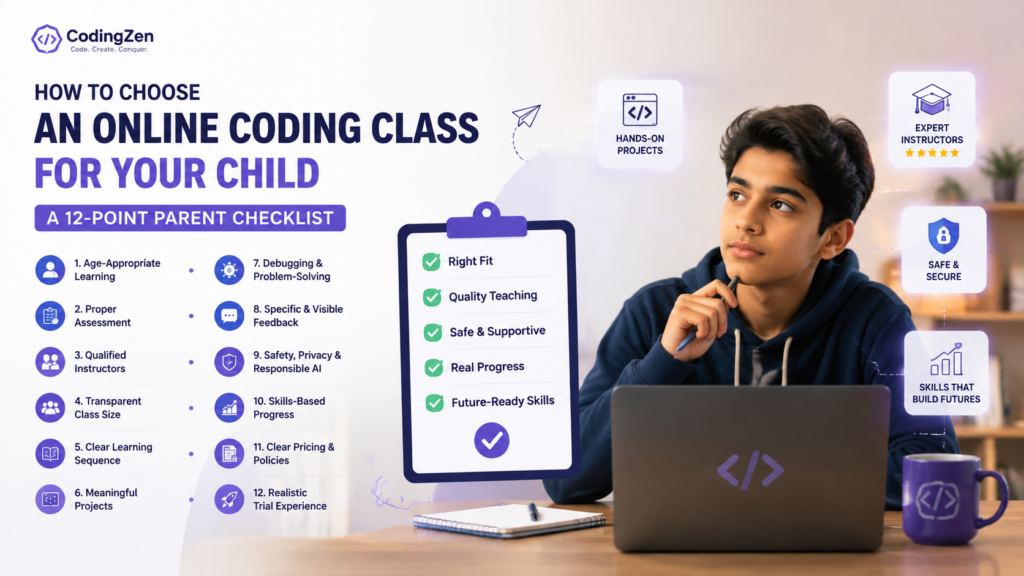
The twelve-point checklist below is designed to turn a sales conversation into a learning-quality conversation. Not every course will be perfect in every area, but a provider should be able to explain its choices clearly and provide evidence.
1. Is the course genuinely age-appropriate?
Age-appropriate does not mean reducing the font size or adding cartoon graphics. It means the reading level, project scope, interface, session length and expectations suit the learner’s developmental stage.
A course for ages five to seven should prioritise visual cause and effect, short creative tasks and simple instructions. A course for pre-teens can introduce longer projects and text-based programming. A teen course should offer deeper technical work and more independence.
Ask what students at that age build during the first four weeks. If the answer is the same for every age, the programme may not be meaningfully differentiated.
Also ask how the provider handles a child who is advanced or new for their age. Age bands should guide placement, not replace assessment.
2. Is there a proper starting assessment?
A trial class should do more than entertain the child and present a discount. The instructor should observe typing comfort, reading confidence, logical reasoning, attention, prior experience and response to errors.
For younger children, assessment can be informal: following sequences, predicting outcomes and explaining a simple project. For older students, it can include a small coding task, project discussion or review of previous work.
The result should be a recommendation with reasons. “Start with Python because your child is eleven” is weaker than “Start with Scratch for six weeks because the student understands sequence but needs confidence with independent decisions before moving to text.”
Assessment reduces frustration and prevents a course from being selected only because its title sounds advanced.
3. Are instructors qualified to teach children, not only to code?
Technical knowledge is necessary, but teaching children requires additional skills. An instructor must diagnose misunderstanding, ask useful questions, manage frustration, explain concepts in several ways and know when to step back.
Request instructor profiles. Look for relevant education or technology experience, training, subject specialisation and the age groups they teach. Ask whether instructors are employees, long-term contractors or frequently changing freelancers. Continuity matters because the teacher learns how the child thinks.
A strong provider should explain its selection, training and observation process. It should also have safeguarding, communication and escalation policies.
Be cautious when the only proof is an impressive institutional logo without named people or teaching evidence.
4. Is the class size transparent?
“Small group” can mean three students or fifteen. Ask for the maximum, not the average. Also ask whether an assistant supports the instructor and how groups are matched.
Younger learners and complex project courses generally require more individual attention. A group of four beginners may work well with a skilled teacher, while a larger webinar-style class may provide little feedback.
Observe who controls the keyboard during a trial. Each child should build, not merely watch a shared screen. The teacher should check individual understanding rather than asking the group, “Everyone got it?”
If CodingZen offers both 1:1 and groups, its website should use consistent group-size information across the homepage, course pages and FAQs.
5. Does the curriculum show a clear learning sequence?
A curriculum should explain how one stage prepares for the next. A long list of trendy technologies is not a sequence.
For example, a Python pathway might move from input and variables to conditions, loops, functions, data structures, files, APIs and projects. An AI course should state the Python and data prerequisites rather than placing neural networks beside beginner concepts.
Ask to see module outcomes, not only topic names. “Functions” is a topic. “Students divide a quiz application into reusable functions and explain why each function exists” is an outcome.
The curriculum should be reviewed regularly, especially in AI and web development. Ask who approves changes and when the page was last updated.
6. Are projects meaningful and progressively independent?
Project-based learning is now used in almost every course description, but the phrase can hide very guided work. Ask how much of each project is copied, demonstrated, scaffolded and chosen by the student.
Early projects may be closely guided. Over time, learners should make more decisions: theme, features, structure, test cases and presentation. A portfolio should show progression from replication to adaptation to original creation.
Request examples from students at the same age and level. Do not compare a beginner’s work with the provider’s best competition winner. Look for explanation, not only polish.
A strong final project includes a problem statement, user, feature list, testing and reflection. The child should be able to explain the code in their own words.
7. How does the teacher handle mistakes and debugging?
Coding involves frequent errors. The course’s response to those errors reveals its teaching quality.
A weak approach fixes the code immediately so the lesson can continue. A stronger approach helps the child read the message, identify the last change, form a hypothesis and test one correction. The teacher provides enough support to prevent panic without removing the thinking.
Ask what happens when a student is stuck for ten minutes. Ask whether debugging strategies are taught explicitly. Look for language that treats errors as information rather than failure.
During a trial, notice whether the instructor asks questions or simply tells the learner what to click. The objective is not to make every session frictionless. It is to help the child become more capable of resolving friction.
8. Is feedback specific and visible?
“Doing well” is not a useful progress report. Feedback should describe what the child can do, where they need support and what the next step is.
Useful feedback might say: “The student can use conditions independently but still needs prompting to plan variables before coding.” It may include a project rubric, code comments, short video review or parent meeting.
Ask how often feedback is provided and who receives it. Older students should receive direct feedback and learn to act on it. Parents need enough information to understand progress without controlling every detail.
The provider should also have a process for concerns. If a child is bored, overwhelmed or repeatedly absent, the issue should not remain invisible until the course ends.
9. Are child safety, privacy and responsible AI addressed?
Online learning involves accounts, recordings, communication tools and project sharing. Parents should know which platforms are used, whether sessions are recorded, who can access recordings and how long data is retained.
Children should not be asked to publish full names, school details, contact information, private photographs or API keys in public projects. AI tools should be approved, age-appropriate and used with clear privacy rules.
Ask whether instructors communicate only through official channels, how one-to-one sessions are supervised and what safeguarding training exists. Ask for written policies rather than relying on verbal assurance.
A responsible provider will welcome these questions and explain the system calmly.
10. Is progress measured through skills rather than attendance?
Completion certificates can be motivating, but attendance is not the same as mastery. A student may attend every lesson while relying heavily on the instructor.
Ask what the learner must demonstrate to complete a level. Does the course include an independent project, presentation, assessment or code review? Are skills mapped to observable outcomes?
Progress should include technical understanding, project independence, debugging, communication and responsible use. Not every child needs a formal examination, but the provider should know what success looks like.
The strongest evidence is a child who can explain the project, make a change and recover from an error with decreasing support.
11. Are pricing, scheduling and cancellation terms clear?
Parents should be able to compare the total hours, format, group size, fee, taxes, rescheduling rules, missed-class policy, refund terms and included resources.
Hourly, monthly and package prices should not be mixed without explanation. “Starts on demand” and “starts periodically” need specific meaning. If group batches require minimum enrolment, say so.
Ask whether the same instructor is guaranteed, whether fees change after an introductory package and whether recordings or catch-up sessions are included.
Clear commercial terms improve trust and reduce disputes. They also support SEO indirectly because satisfied visitors are more likely to complete forms and less likely to return immediately to search results.
12. Does the trial reflect the real course?
A trial should resemble normal teaching. If the child will join a group, the trial should demonstrate group interaction or clearly explain the difference. If the course is project-based, the learner should make something rather than watch a presentation.
The instructor should assess, teach one meaningful idea, allow the child to attempt it and discuss next steps with the parent. A trial that is only a flashy game may create excitement without revealing fit.
After the session, ask the child what they understood, what they made and what felt difficult. Ask the instructor for a placement recommendation and the evidence behind it.
Do not feel pressured to decide during the call. A responsible provider can summarise the recommendation in writing.
Warning signs to take seriously
Be cautious if the course guarantees a career outcome, claims mastery in an unrealistically short period or promotes many advanced technologies without prerequisites. Other warning signs include copied student portfolios, anonymous instructors, inconsistent class-size information, no written policies and projects the child cannot explain.
Also watch for pressure-based sales tactics, discounts that expire during the trial, and refusal to provide a curriculum before payment. A course can be commercially confident without preventing informed comparison.
The absence of negative feedback is not proof of quality. Look for detailed reviews that mention instructors, projects, support and progression rather than generic praise.
A simple parent scorecard
Score each area from one to five: age fit, assessment, instructor quality, class size, curriculum, project independence, debugging, feedback, safety, progress measurement, commercial clarity and trial quality.
Do not choose only by the total. Identify deal-breakers. For one family, scheduling may be essential. For another, privacy or a specialised instructor may matter most.
Write one sentence explaining each score. This prevents a polished sales call from replacing evidence. Compare no more than three serious options; evaluating ten providers can create noise without improving the decision.
Finally, include the child’s response. Enjoyment alone is not enough, but sustained curiosity and willingness to try matter.
Frequently asked questions
Should parents choose the most advanced course available? No. Choose the level where the child can understand, create and gradually become independent.
Are free classes enough to learn coding? Free resources can be excellent for motivated learners, but many children benefit from sequence, feedback and accountability.
How long should a course be? Long enough to build and revise meaningful projects. Avoid judging value only by number of sessions.
Do certificates matter? They can document participation. Projects, explanations and independent skills are stronger evidence.
What if the child dislikes the trial? Ask why. The issue may be the teacher, project, format, pace or coding itself.
Should parents sit in every class? Usually not. Younger children may need setup help, but the goal is growing independence with appropriate supervision.
Conclusion
Choosing a coding class should not require faith in marketing language. Parents can evaluate a programme through specific evidence: placement, teacher quality, class size, project progression, feedback, safety and transparent terms.
The best course is not necessarily the cheapest, most expensive or most technologically impressive. It is the one that helps the child understand what they are doing, persist through problems and create work that becomes more independent over time.
Use the twelve checks before paying, then revisit them after the first month. A good provider should continue earning trust after enrolment.
What to review after the first month
A decision is not finished when the fee is paid. After four to six sessions, review whether the promised experience is actually happening. Ask the child to open a recent project and explain one feature without notes. Check whether the instructor is giving specific feedback and whether class time is spent building rather than watching.
Compare the current experience with what was described during enrolment. Is the group size accurate? Is the same instructor teaching? Are projects appropriate for the child’s level? Are missed classes and parent updates handled as promised?
Raise concerns early and give the provider a reasonable opportunity to respond. A strong programme should be able to adjust pace, project difficulty or format. If the child remains a passive copier or repeatedly leaves confused, do not assume that more time will automatically solve the mismatch. Quality should become more visible as the course progresses.