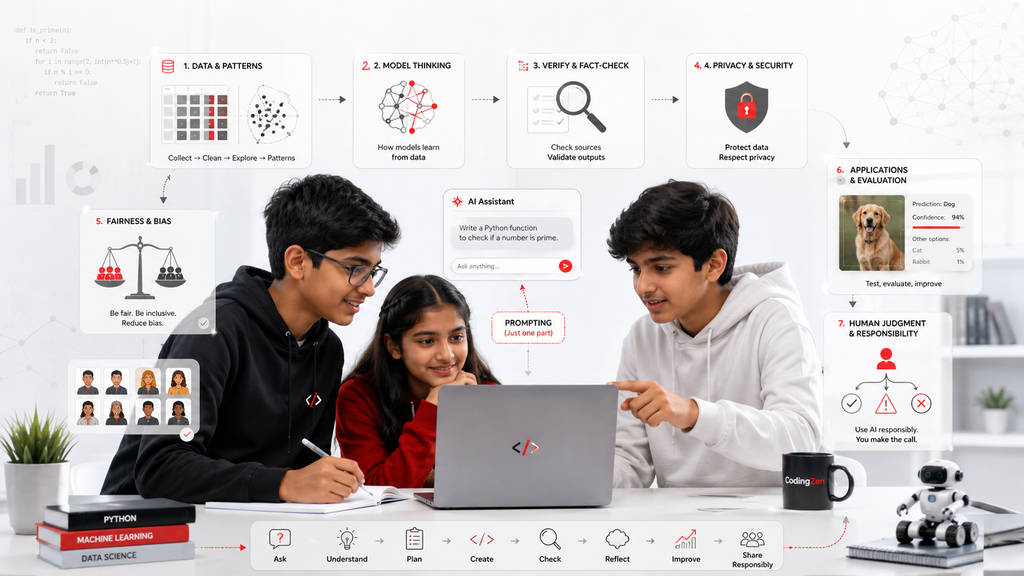
AI literacy is larger than learning how to write a prompt
Children are already encountering artificial intelligence through search, recommendation systems, image tools, writing assistants, games and classroom software. Teaching them only how to ask a chatbot for an answer would be like teaching someone to drive by showing them one button on the dashboard. Prompting is useful, but it is a small part of genuine AI literacy.
A child who understands AI should know that systems learn patterns from data, that outputs can be convincing and wrong, that bias can enter through data and design, and that private information should not be shared casually. Older students should also understand that an AI model does not “know” or “believe” in the human sense. It generates an output based on patterns and instructions.
This distinction matters in 2026 because AI tools are becoming easier to use while their internal complexity remains hidden. Ease of use can create an illusion of understanding. A student may produce a polished presentation or image without being able to explain where the information came from, what was changed, or whether the result is fair and accurate.
Good AI education should help children become thoughtful users, curious investigators and, when age-appropriate, responsible builders. It should not simply turn them into faster consumers of generated content.
What artificial intelligence means in simple language
Artificial intelligence is a broad term for computer systems designed to perform tasks that usually require forms of human judgement, recognition, prediction or language processing. Examples include identifying objects in photographs, recommending a video, translating text, predicting which email is spam and generating an answer to a question.
Many current AI systems are based on machine learning. Instead of writing a separate rule for every situation, developers train a model using examples. A system that distinguishes cats from dogs may be shown many labelled images. It looks for patterns that help it make a prediction when it sees a new image.
Generative AI is designed to create new outputs such as text, images, audio, video or code. It produces results based on patterns learned from large amounts of data and the instructions provided by the user. This does not make every output original, accurate or appropriate.
For younger children, these concepts can be taught through sorting games, pattern activities and discussions about recommendations. Teenagers can explore datasets, train small models and compare predictions. The explanation should grow with the child, but the core idea remains: AI systems process data and produce outputs; people are responsible for deciding how those systems are designed, used and checked.
The difference between using AI and understanding AI
A child can use an AI tool within minutes. Understanding it requires more deliberate learning. A user knows which button to press. An informed user knows what information the tool may need, what risks exist and how to verify the result. A builder goes further by understanding data, models, testing and limitations.
Consider a student asking an AI system to explain a science topic. Using the tool involves typing the question. Understanding the tool involves asking: Is the answer supported by a reliable source? Did the system invent a reference? Is the explanation appropriate for my level? Did I share any identifying information? Can I explain the topic without copying the answer?
Now consider an image generator. Using it means entering a description. Understanding it includes thinking about copyright, stereotypes, manipulated media and how training data shapes what the system produces.
A well-designed course should create moments where AI makes a mistake. Students need to see that fluent language and confident presentation are not evidence of truth. They should compare outputs, investigate sources and improve instructions while retaining their own judgement.
What children should learn at different ages
For children around six to nine, AI education should focus on recognition and questioning. They can learn that some devices make predictions, that recommendations are chosen by systems, and that not everything generated by a computer is true. Activities can involve sorting objects, guessing what information a system would need and discussing why two people might receive different recommendations.
For ages ten to thirteen, students can explore simple datasets, classification and pattern recognition. They can use safe, age-appropriate tools to train a small model and observe what happens when examples are limited or unbalanced. They should practise checking AI-generated claims and learn not to upload personal data, photographs or private school information without permission.
Teenagers can study Python, data processing, supervised and unsupervised learning, evaluation, bias, neural networks and responsible deployment. They can create simple recommendation systems, image classifiers or text projects while documenting limitations.
At every age, the learner should understand human responsibility. “The computer decided” is not an adequate explanation when people selected the data, objective, interface and context. AI literacy includes asking who benefits, who may be excluded and who checks the result.
Data is the foundation—and the source of many problems
Machine-learning systems learn from data. That makes data quality one of the most important ideas for students to understand. If examples are incomplete, inaccurate or unrepresentative, the model may produce weak or unfair results.
A simple classroom activity can demonstrate this. Imagine training a model to recognise fruit using twenty photographs, but almost all apple images are red and all green objects are pears. The model may learn colour rather than the shape and texture that humans associate with an apple. When shown a green apple, it may fail.
Older students can examine class balance, missing values, labels and data collection. They can ask whether a dataset represents the people or situations in which the model will be used. They should understand that collecting more data is not always the right solution, especially when privacy is involved.
UNICEF’s guidance on AI and children emphasises protecting children’s data and adopting privacy-by-design approaches. In practical terms, a child should never be encouraged to collect sensitive information simply to make a project seem more realistic. Safe synthetic or public educational datasets are often better choices.
Hallucinations: why confident language can still be wrong
Generative AI may produce information that sounds plausible but is false, unsupported or internally inconsistent. These errors are often described as hallucinations. The term can be confusing for children, so the concept should be explained plainly: the system is producing a likely sequence, not checking truth in the same way a careful researcher would.
Students should practise a verification routine. First, identify factual claims. Second, look for original and trustworthy sources. Third, compare more than one source where the matter is important. Fourth, check dates because information may have changed. Fifth, rewrite the idea in their own words only after understanding it.
Teachers should deliberately include verification in assignments. Asking students to “use AI” without requiring source checks encourages passive acceptance. Asking them to analyse one correct and one incorrect answer builds judgement.
Children also need permission to say, “I do not know yet.” AI tools can create pressure to produce an immediate answer. Responsible learning values uncertainty and investigation over speed.
Bias, fairness and representation
AI systems can reproduce or amplify bias present in data, labels, design decisions and the way outputs are used. This topic should not be reserved only for advanced computer scientists. Children can understand fairness when examples are concrete.
Suppose a voice system works well for one accent but poorly for another. A photo classifier may perform differently across lighting conditions or skin tones. A recommendation system may repeatedly show only one kind of career or lifestyle. These outcomes are not neutral simply because a computer produced them.
A useful student exercise is to test a system with varied examples and document where it struggles. Teenagers can compare confusion matrices or error rates, but younger children can still notice patterns in who is represented and who is missing.
UNESCO’s student AI framework emphasises critical judgement, responsible citizenship and inclusive design. A classroom should therefore ask not only “Does the model work?” but “For whom does it work, under what conditions, and what could happen if it is wrong?”
Privacy and the rule of minimum necessary information
Children often treat digital tools as conversational spaces, which can make them more willing to share personal information. AI education must include a simple rule: provide only the minimum information necessary for the task.
A student does not need to enter a full name, school, address, phone number, health detail, photograph or family information to ask for help with a general concept. If a project uses data about people, the teacher should explain consent, storage, access and deletion in age-appropriate language.
Parents should check which tools are used, whether accounts are required, how data is handled and whether public sharing is enabled. Schools and course providers should have a documented approval process rather than allowing instructors to introduce new tools informally.
Privacy is not a separate legal lecture added at the end. It should shape project design from the beginning. A strong student project can demonstrate that useful systems are possible without collecting everything.
Copyright, authorship and academic honesty
Generative tools blur the line between assistance and authorship. Children need clear expectations. Using AI to brainstorm a list, explain an error or suggest questions is different from submitting generated work as an original project without understanding it.
Students should be able to state where AI was used, what they changed, what they verified and which parts they created independently. This disclosure habit is more valuable than pretending the tool was not involved.
For images, music, text and code, learners should understand that availability does not automatically mean permission. They should prefer original assets, licensed resources and proper attribution. When an AI system generates content, questions about training data and rights may still exist.
A CodingZen project policy could require a short “AI use note” for older students. For example: “I used an AI assistant to explain an error message and suggest three testing cases. I wrote the final code, tested it and can explain each function.” That statement demonstrates both transparency and ownership.
Age-appropriate AI projects
Young children can create a rule-based “smart” character and discuss the difference between fixed rules and learning from examples. They can sort images into groups, design a recommendation activity or test whether a simple classifier recognises drawings.
Pre-teens can build a basic image or sound classifier with a controlled dataset, compare results and identify mistakes. They can also create a fact-checking worksheet for generated text or design a chatbot flow without using personal information.
Teenagers with Python experience can work on sentiment analysis, recommendation systems, simple regression, image classification or data visualisation. The project should include a problem statement, dataset description, evaluation method, limitations and responsible-use discussion.
Avoid projects that make high-stakes claims about health, mental state, identity, ability or risk. A teenager may technically be able to build a model that labels people, but the educational value must be weighed against privacy, bias and harm. Safe project selection is part of responsible instruction.
How parents can evaluate an AI course
A strong course should explain prerequisites clearly. If advanced Python is required, the provider should assess whether the student can use functions, data structures and debugging independently. If the course is introductory, it should not hide a basic prompting workshop behind advanced language.
Ask what students will build, what datasets they will use and how accuracy is evaluated. Ask how privacy, bias, misinformation and authorship are taught. Ask whether students will understand the code or rely on prebuilt interfaces. Ask who reviews the curriculum and how frequently it is updated.
Be cautious of promises that a child will “master AI” in a few sessions. Artificial intelligence includes many fields and levels of mathematical and technical depth. A short programme can provide valuable literacy or a project introduction, but it should describe its scope honestly.
The best evidence is a student who can explain the problem, data, model, result and limitation. A polished demo without explanation is not enough.
A responsible AI framework for students
CodingZen can organise AI learning around six questions.
Purpose: What problem are we trying to solve, and should AI be used at all?
Data: What information is needed, where did it come from and do we have permission to use it?
People: Who may benefit, who may be excluded and who could be harmed by an error?
Performance: How will we test the result, and what does a good score actually mean?
Privacy: Are we collecting the minimum necessary information, and how will it be protected?
Proof: Can the student explain the work, verify generated information and disclose where AI assisted?
These questions should appear in project worksheets, reviews and presentations. They make ethics practical rather than abstract. They also help students understand that responsible technology is a design skill, not a warning label added after the code is finished.
Frequently asked questions
Should young children use generative AI? Use should be supervised, age-appropriate and governed by the tool’s terms and privacy practices. Younger children benefit more from guided discussion and creative activities than unrestricted chatbot use.
Does a child need Python before learning AI? Not for basic AI literacy. Technical machine-learning projects usually require some programming foundation, and Python is commonly used.
Is prompting a valuable skill? Yes, but it is not a complete AI education. Students also need verification, data understanding, privacy and judgement.
Can AI help with homework? It can explain ideas or support brainstorming, but the student should follow school rules, verify information and remain the author of submitted work.
How can parents protect privacy? Avoid sharing identifying information, review tool settings, use approved platforms and teach the minimum-necessary-information rule.
What is a good first AI project for a teenager? A small classifier or recommendation experiment using a safe dataset, with documented testing and limitations.
Will AI replace the need to learn coding? AI may change how coding is done, but understanding logic, systems, debugging and evaluation remains important for using generated code responsibly.
Conclusion
Children do not need fear-based warnings or exaggerated promises about artificial intelligence. They need a practical education that combines curiosity with judgement.
An AI-literate student understands that systems learn from data, generated outputs require verification, privacy matters, bias can appear, and people remain responsible for design and use. A technically capable teenager should also be able to build, test and explain a project without hiding behind the tool.
In 2026, the strongest AI course is not the one that produces the fastest impressive demo. It is the one that helps a child become more thoughtful, transparent and capable each time technology becomes easier to use.