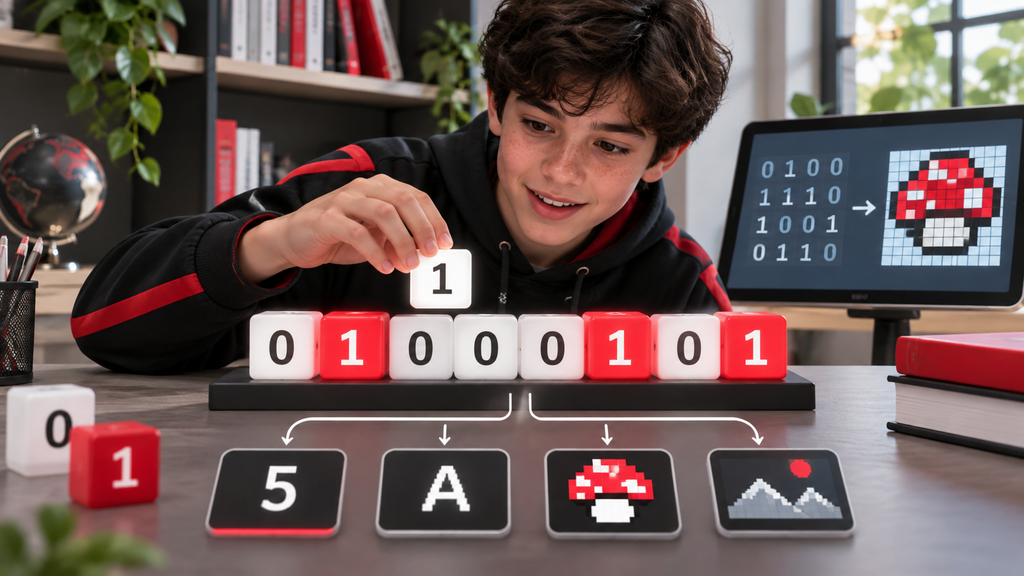
Ask a child how many colours a computer can display, and they might confidently answer millions. Ask how many different symbols the binary number system uses, and the answer is surprisingly simple: two.
Every digital photograph, video game, text message and computer program is ultimately represented using combinations of binary digits.
But how can just two digits represent so much information?
Exploring binary numbers for kids introduces children to one of the most fundamental concepts in computer science. It helps them understand what happens behind the screens they interact with every day, making technology feel less mysterious and more understandable.
Children do not need advanced mathematics or previous programming experience to begin exploring this concept.
What Are Binary Numbers?
Binary is a number system that uses only two digits: 0 and 1.
The number system we commonly use in everyday life is called decimal. It uses ten digits, ranging from 0 to 9.
Binary works differently because it uses only two possible digits in each position.
Here is how some familiar decimal numbers appear in binary:
| Decimal Number | Binary Number |
|---|---|
| 0 | 0 |
| 1 | 1 |
| 2 | 10 |
| 3 | 11 |
| 4 | 100 |
| 5 | 101 |
| 6 | 110 |
| 7 | 111 |
| 8 | 1000 |
Although binary numbers may initially look unusual, they follow a predictable mathematical pattern.
Once children understand that pattern, reading simple binary numbers becomes much easier.
Why Do Computers Use Binary Numbers?
Computers contain electronic circuits that can reliably distinguish between two different states, commonly represented by lower and higher voltage levels.
These states can represent:
- 0 as one state
- 1 as the other state
A single binary digit is called a bit.
By combining many bits, computers can represent increasingly complex information. These combinations can represent numbers, characters, colours, instructions and other forms of digital data.
A useful analogy for children is a collection of light switches. One switch provides two possible states. Adding more switches creates additional combinations.
Modern computer systems use this fundamental principle on a much larger and more complex scale.
How to Teach Binary Numbers for Kids Using Everyday Examples
Parents can introduce the binary number system without downloading software or writing a single line of code.
The Four-Card Activity
Take four pieces of paper and write the following numbers on them:
8
4
2
1
Each card represents a binary place value.
Arrange the cards from largest to smallest. Explain that every card can be either selected or unselected.
A selected card represents 1. An unselected card represents 0.
Ask your child to create the number 13 by selecting cards.
They will need 8, 4 and 1.
The resulting binary number is 1101.
This activity introduces place value, number representation and pattern recognition in a simple, visual manner.
Try the binary number activity
Tap each card to switch between 0 and 1.
Value: 81Selected
Value: 41Selected
Value: 20Unselected
Value: 11Selected
Binary number
1101
Decimal number
13
8 + 4 + 0 + 1 = 13Reset activity
How Computers Turn Binary Code into Text and Images
Understanding binary becomes particularly interesting when children discover its connection to the digital content they enjoy.
How Computers Represent Letters
Computers use character encoding systems to represent letters, numbers and punctuation marks.
For example, in ASCII encoding, the uppercase letter A corresponds to the decimal value 65, which can be represented in eight-bit binary as 01000001.
Other characters have their own assigned values.
Modern character encoding systems, such as Unicode and UTF-8, support characters from numerous languages, including Hindi, Japanese and Arabic.
This allows children to understand how computers can store and display messages written in different languages.
How Computers Represent Images
Digital images consist of tiny picture elements called pixels.
Each pixel contains colour information that can be represented numerically.
In a simple black-and-white image, a child could use 0 to represent white and 1 to represent black.
By arranging these values in a grid, they can create a recognisable picture.
Binary data
Resulting pixel image
In this simplified example, 1 represents a coloured pixel and 0 represents the background.
More complex digital images use additional bits to represent different colours and levels of detail.
The basic principle helps children connect mathematical information with digital creativity.
Bits and Bytes Explained for Young Learners
Once children understand binary digits, they can begin exploring how digital information is measured.
A bit is a single binary digit. A byte consists of eight bits.
Larger units, such as kilobytes, megabytes and gigabytes, are used to describe amounts of digital information.
Children may already recognise these terms from downloading games, saving photographs or checking the storage available on a tablet.
Understanding bits and bytes gives these familiar measurements additional meaning.
It also creates opportunities to discuss why a detailed photograph generally requires more storage than a short text message.
What Can Children Learn from Understanding Binary?
Learning binary introduces several important computer science concepts that children can explore before moving into more advanced programming.
These include:
- Recognising mathematical patterns and relationships.
- Understanding how information can be represented in different forms.
- Converting between number systems.
- Exploring the connection between hardware and software.
- Following consistent rules to interpret digital information.
Binary is also an example of abstraction, a fundamental computer science concept in which complex information is represented in a more manageable form.
Children do not need to memorise extensive binary sequences. Understanding the underlying principle is a more valuable starting point.
How Binary Knowledge Connects with Learning Programming
Most beginner programming languages do not require children to write instructions directly in binary.
Languages such as Python allow programmers to express instructions using readable words, symbols and numbers.
However, understanding binary can help children recognise the distinction between the instructions they write and how digital systems represent and process information.
As students progress, this knowledge can support their understanding of topics such as data representation, computer memory, digital graphics and programming operations.
It provides context for the technology they are learning to create.
How CodingZen Helps Children Explore Computer Science
At CodingZen, coding education is approached through practical learning, experimentation and digital creation.
Computer science concepts become more meaningful when children can connect them to something they build or investigate.
For example, a binary learning activity could progress into creating pixel artwork, designing a number conversion program or developing a simple digital encoding activity.
These experiences allow children to explore the relationship between mathematical concepts and functioning technology.
Through structured, age-appropriate coding education, young learners can gradually move from understanding how digital information works to creating their own programs and projects.
Conclusion
Exploring binary numbers for kids offers an opportunity to look beyond the visible interface of a computer and understand how digital information is represented.
Something as simple as two digits can introduce children to number systems, digital images, text encoding and fundamental computer science principles.
Parents can encourage this curiosity through everyday demonstrations before introducing more structured programming activities.
Explore CodingZen’s online coding education programmes to help your child discover computer science through hands-on learning, practical projects and meaningful digital creation.
Frequently Asked Questions
1. What are binary numbers in simple words?
Binary numbers belong to a number system that uses only two digits, 0 and 1. Computers use combinations of these digits to represent digital information.
2. At what age can children learn binary numbers?
Children who understand basic counting and addition can begin exploring binary through visual activities. More advanced conversions can be introduced as their mathematical understanding develops.
3. Do children need to understand binary before learning coding?
No. Children can begin learning programming without knowing binary. However, binary provides useful foundational knowledge about how computers represent information.
4. What is the difference between a bit and a byte?
A bit is a single binary digit, while a byte consists of eight bits. Both are commonly used to describe digital information.
5. Can children practise binary coding without a computer?
Yes. Activities using number cards, light switches, coloured grids and paper-based encoding exercises can introduce binary concepts without requiring a digital device.