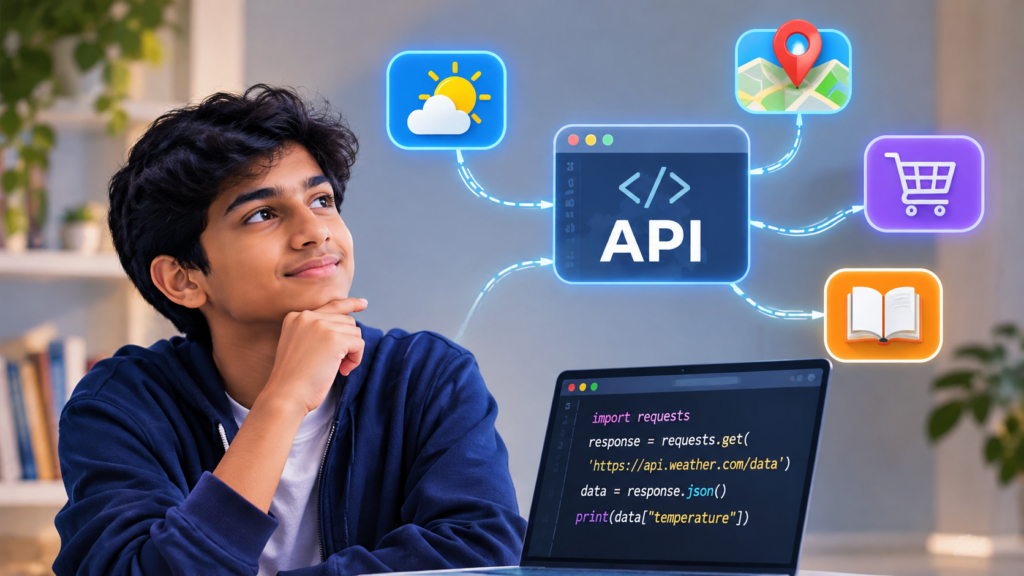
Imagine your child opens a weather application before leaving for school.
Within seconds, the screen displays the temperature, forecast, and possibility of rain.
But the weather application does not necessarily measure the temperature outside your house.
So where does that information come from?
In many cases, the application requests information from another service that provides weather data.
That exchange is made possible through something called an API.
If you have wondered what an API is for kids, the simplest explanation is that an API allows different software systems to communicate through a defined set of rules.
Understanding APIs introduces children to an important concept in programming: applications do not always work independently. Many use information or functionality provided by other systems.
What Is an API for Kids?
API stands for Application Programming Interface.
It is a set of rules that allows one software system to interact with another.
An API defines how a request should be made, what information or actions are available, and how a response will be structured.
Think of an API Like a Restaurant Menu
Imagine visiting a restaurant.
The menu tells you what dishes you can order. You select something, communicate your request, and receive the result.
You do not need to enter the kitchen or understand every cooking process.
An API works in a somewhat similar way.
It tells a program which operations are available and how to request them.
For example, a weather service might provide an API that allows applications to request current temperature information for a particular city.
The requesting application does not need to operate its own weather-monitoring network.
This analogy is useful for beginners, although real APIs are based on technical specifications rather than human conversations.
How Do APIs Work? A Simple Example
Suppose a teenager is developing an application that displays information about different countries.
The application needs to show each country’s capital, population, and currency.
Rather than manually entering all the information, the student could use a suitable country-information API.
The process generally follows three steps.
Step 1: The Application Sends a Request
The student’s application asks the API for information about a particular country.
The request identifies the information needed and follows the API’s required format.
Step 2: The Server Processes the Request
The service receiving the request checks what information has been requested.
It may retrieve information from a database or another internal system.
Some APIs also require authentication, which helps determine whether the requesting application is authorised to access the service.
Step 3: The API Returns a Response
The service sends information back in a structured format.
Many web APIs use JSON, which stands for JavaScript Object Notation.
A simplified response might look like this:
{
  "country": "Japan",
  "capital": "Tokyo",
  "currency": "JPY"
}
The application can then use this information to display a result.
Students begin to understand how software can request, receive, and organise external information.
Where Do Children Encounter APIs in Everyday Life?
APIs are involved in many familiar digital experiences.
Weather Applications
Weather applications may retrieve forecasts and temperature information from external weather-data services.
The information can then be displayed using the application’s own visual design.
Online Shopping Platforms
Shopping systems may use APIs to communicate with payment providers, inventory services, and other business software.
These integrations help different systems exchange the information necessary to complete particular tasks.
Maps and Navigation
Applications can use mapping APIs to display maps, calculate routes, or access geographic information.
The exact functionality depends on the API provider.
Educational Applications
An educational platform might use APIs to connect different services, such as authentication systems or learning-related resources.
These examples demonstrate that APIs are not limited to advanced programming projects.
They are part of the infrastructure supporting many everyday applications.
What Is the Difference Between an API and a Website?
Parents sometimes wonder whether using an API is the same as visiting a website.
Both may involve communication with a server, but their purposes are different.
A website generally presents information through an interface designed for people.
An API provides a defined interface that software can use to request information or perform operations.
For example, a person might visit a weather website to read a forecast.
A program might use the website provider’s API, if available, to retrieve weather information automatically.
Not every website offers a public API, and not every API is accessible through a web browser.
Understanding this distinction helps children recognise that applications can communicate in ways that are not directly visible to users.
Can Children Learn APIs Through Python?
Yes. Students who understand basic programming can begin exploring APIs using Python.
Python includes libraries that help programs send requests and process responses.
For example, a student might use an openly accessible educational API to retrieve information and display selected details.
Before working with an API, students should understand several foundational concepts:
- Variables and basic data types
- Functions and program execution
- Lists and dictionaries
- Basic error handling
- How JSON represents structured information
These concepts help students understand what happens after an API returns data.
A beginner does not need to develop an API immediately.
Learning to use a simple existing API can be an accessible starting point.
What Are REST APIs?
REST stands for Representational State Transfer.
It describes an architectural style commonly used when designing web services.
Many REST-style APIs communicate through HTTP, the protocol used for transferring information on the web.
Some frequently encountered HTTP methods include:
GET: Requests information from a resource.
POST: Submits information for processing, often creating a resource.
PUT: Commonly replaces or creates a resource at a specified address.
DELETE: Requests removal of a resource.
The precise behaviour depends on how a particular API is designed.
For younger learners, understanding that different requests can perform different operations is sufficient.
Older students can explore these methods while creating more advanced web development projects.
Why Learning APIs Can Make Coding Projects More Interesting
Beginners often create programs using information entered directly into their code.
This is useful for understanding basic programming logic.
However, APIs introduce the possibility of working with information obtained from external services.
A student creating a country-information application, for example, could retrieve updated records from a suitable data provider instead of maintaining every record manually.
This introduces new programming considerations.
What happens if the internet connection fails?
What if the API returns incomplete information?
What if the requested resource does not exist?
How should the application respond when the service is temporarily unavailable?
These questions encourage students to think about how software behaves outside ideal conditions.
They also demonstrate why testing and error handling matter.
Understanding API Keys and Digital Security
Some APIs require an API key or another form of authentication.
An API key is often used to identify the application making requests.
It may also help a provider apply access permissions or usage limits.
Children should understand that API keys can be sensitive.
A secret API key should not be published in shared code, screenshots, or public repositories.
Students should also avoid sending personal information to unfamiliar services.
When experimenting with APIs, parents and educators can encourage the use of trusted educational resources, sample data, and appropriate privacy practices.
Learning how to access information responsibly is part of understanding how software systems work.
How CodingZen Connects API Concepts With Practical Learning
Understanding APIs becomes more meaningful when students can connect the concept with a program they are building.
Rather than memorising technical terminology, learners can explore how information moves between systems and how applications use the results.
At CodingZen, the emphasis on hands-on, project-based coding education supports this kind of practical technology exploration.
Students can gradually develop an understanding of programming fundamentals, external data, and application behaviour as their skills progress.
API concepts are particularly relevant to learners interested in Python, web development, and creating applications that interact with other digital services.
The learning objective is to understand how different parts of a software system communicate and work together.
Conclusion: APIs Help Explain the Technology Behind Everyday Apps
Understanding what an API is for kids opens up an important part of modern programming.
APIs allow software systems to exchange information or request functionality through defined interfaces.
They help explain how weather applications access forecasts, how shopping platforms connect services, and how programs retrieve external information.
For children learning coding, APIs provide a practical connection between programming fundamentals and the applications they already recognise.
As students become more comfortable with variables, functions, structured data, and basic networking, they can begin exploring simple API-based projects.
Interested in helping your child understand how real applications work?
Explore CodingZen’s online coding programmes to discover a project-based approach to learning programming and building practical technology skills.
Frequently Asked Questions
1. What is an API in simple terms for kids?
An API, or Application Programming Interface, is a set of rules that allows software systems to communicate. It defines how one program can request information or functionality from another.
2. Do children need to know coding before learning APIs?
Basic programming knowledge is helpful before using APIs in projects. Students should ideally understand variables, functions, and simple data structures before working with API responses.
3. Can beginners use APIs with Python?
Yes. Python can send requests to suitable web APIs and process the information returned. Beginners can start with simple public educational APIs that do not require complex authentication.
4. What is the difference between an API and a database?
A database stores and organises information. An API provides an interface through which software can request information or perform operations. An API may interact with a database, but the two serve different purposes.
5. Are APIs safe for children to use?
APIs can be suitable for educational projects when chosen and used appropriately. Students should use trusted services, follow access requirements, protect API keys, and avoid sharing sensitive personal information.