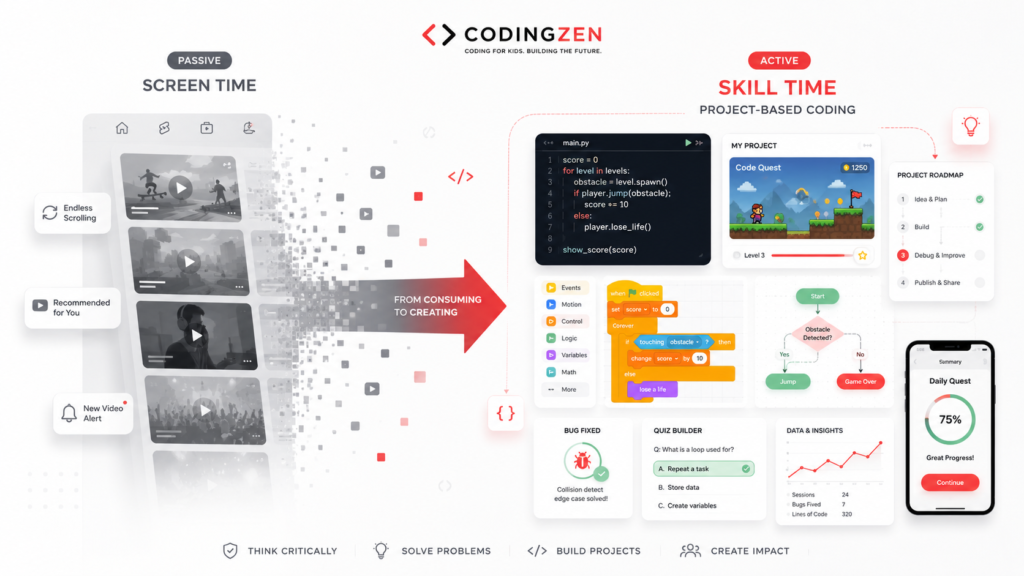
The phrase “screen time” hides important differences
A child watching an endless stream of short videos, speaking to grandparents, researching a school topic and debugging a game may spend the same number of minutes on a screen. The experience is not the same.
Screen-time totals are easy to count, so they often become the entire conversation. But duration alone does not show the quality of the content, the child’s purpose, the level of participation or what the activity is replacing. A ninety-minute coding session can involve planning, reading, creating, testing and explaining. It can also become unproductive if the child is copying without understanding, working late at night or becoming distressed.
The more useful question is not, “Was a screen used?” It is, “What was the child doing, how were they doing it, and what did it crowd out?”
The American Academy of Pediatrics has increasingly encouraged families to look beyond one universal number and consider the child, the content, calming, crowding out and communication. That approach is valuable for coding too. Coding can be a meaningful form of screen use, but it does not receive an automatic exemption from healthy boundaries.
Passive consumption, interaction and creation
Digital activity exists on a spectrum. At one end is passive consumption: the child watches content selected by an algorithm and makes few meaningful decisions. There is nothing inherently wrong with entertainment, but it becomes concerning when use is difficult to stop, repeatedly displaces other needs or exposes the child to unsuitable material.
Interactive use requires more participation. A child may answer questions, play a game, communicate with others or explore a simulation. The quality varies widely. Some interactive products encourage thought; others are designed mainly to maintain attention.
Creative use asks the child to produce or transform something. Coding, digital art, music, video editing and writing can fit here. Creation requires decisions and usually includes periods of effort, revision and frustration.
These categories are not moral labels. A movie with family can support connection, while a stressful coding session can be poorly timed. The categories help parents notice the kind of attention involved and balance the week rather than treating every minute as identical.
What makes coding active rather than passive?
A coding session becomes active when the child has a goal, makes choices and receives feedback from the project. The learner decides how a character behaves, what information a program stores, how a page is organised or which test cases a model should handle.
Typing code is not enough. A child can copy a tutorial for an hour without making a single meaningful decision. The finished result may look impressive, but the learning remains passive. Active coding includes prediction: “What do I think this change will do?” It includes testing: “What happened?” It includes explanation: “Why did I use this loop?”
A strong class therefore gives students increasing ownership. Early lessons can be guided, but project themes, features and solutions should gradually become more independent. The teacher should ask questions rather than constantly taking control.
Parents can test whether coding is active by asking the child to demonstrate one feature and make a small change. If the learner can explain the logic and adapt it, the screen is being used as a tool for creation.
The child matters
Two children can respond differently to the same digital activity. One may become deeply focused and stop comfortably at the end. Another may become irritable, anxious or unable to transition. Age, temperament, attention, current stress and sleep all matter.
A child who is tired after school may struggle with a demanding coding lesson even if they normally enjoy it. A perfectionistic learner may become stuck on one bug. A highly social child may benefit from a small group, while another needs a quieter private session.
Parents should observe patterns rather than judge a single day. Does the child look forward to creating? Can they stop with a clear endpoint? Do they talk about ideas away from the device? Are they still sleeping, moving, reading and spending time with others?
Coding should be adjusted to the learner. Session length, project scope, class format and difficulty can change. The goal is not to force a “productive” activity into every available hour.
Content and context matter
The quality of a coding platform, video or course matters. Age-appropriate tools should support clear learning goals, privacy and safe interaction. A child should not be exposed to open communication features without suitable supervision.
Context also changes the experience. A child coding alone at midnight is different from a supervised afternoon session followed by a break. A project created for personal curiosity is different from one completed under pressure to win a certificate.
Parents do not need to monitor every line of code. They should understand which platforms are used, whether accounts are public, who can communicate with the child and how projects are shared. Younger learners need more direct support with setup and transitions. Older students need growing independence within agreed boundaries.
High-quality content cannot compensate for an unhealthy context. Even educational use should not routinely interfere with sleep, meals, movement or relationships.
What is coding crowding out?
This is one of the most useful questions for any screen activity. Coding may be beneficial, but if it consistently replaces sleep, outdoor movement, schoolwork, family interaction or other interests, the schedule needs adjustment.
A child who loves a project may want to continue late into the evening. Parents can respect the enthusiasm while setting a stopping point. Save the work, write the next step and return later. This teaches project management as well as self-regulation.
Crowding out can also happen emotionally. A child may avoid a difficult offline task by calling coding “educational.” Productive labels should not become loopholes.
A balanced week includes different kinds of effort and rest. Coding can sit alongside sport, music, reading, unstructured play and time with friends. The objective is not to maximise technical hours; it is to support sustainable curiosity and development.
The importance of a clear purpose
Open-ended screen use tends to expand. Purpose creates a natural boundary.
Before a coding session, the child can state a small goal: finish the scoring system, fix one movement bug, design the home page or test three examples. The goal should be achievable within the available time. When it is complete, the student can stop or choose one short extension.
For younger children, the teacher or parent may write the goal on paper. Older students can keep a simple project log with “today,” “problem,” “change” and “next step.”
Purpose also helps parents distinguish effort from wandering. A child may spend twenty minutes reading documentation because it supports the project. Another may switch between unrelated tabs and lose focus. The question is whether the activity serves the stated goal.
This habit prepares students for larger projects. Professional work also depends on defining what “done for today” means.
Healthy breaks and physical setup
Coding often produces intense concentration. That can be satisfying, but the body still needs movement, hydration, varied focus and a suitable workstation.
Set up the device at an appropriate height where possible. Encourage the child to sit comfortably rather than curl over a phone. For longer sessions, use brief movement and eye-focus breaks. The exact rhythm can vary, but the child should not remain rigid for several hours.
Avoid placing regular coding sessions immediately before sleep if the activity makes the learner highly alert. Finish with enough time to close the project and transition.
Breaks should not be framed as punishment or a sign that the child lacks dedication. They are part of effective work. A student who records the next step before leaving can return without losing momentum.
Communication changes the quality of screen use
The most valuable parent action may be conversation rather than surveillance. Ask what the child is building, not only how long they were online. Ask what went wrong and how they solved it. Invite them to teach you one idea.
This shows interest without taking control. It also gives parents clues about the course. A child who can discuss choices is likely participating actively. A child who repeatedly says, “The teacher did it,” may need more ownership.
Families should agree on device rules together when age-appropriate. Discuss where devices are used, which platforms are allowed, how public sharing works and what information must remain private. Rules are easier to follow when the reasoning is clear.
Parents should model the same habits. Constant notifications and divided attention make it difficult to persuade children that screens have boundaries.
When coding becomes unproductive screen time
Coding is not automatically beneficial. It becomes unproductive when the child copies without understanding, watches long tutorials without building, repeatedly opens AI-generated solutions before attempting the problem or works on projects far beyond their level.
Warning signs include persistent distress, inability to stop, loss of sleep, avoidance of other responsibilities and projects that the child cannot explain. A competitive environment can also turn coding into pressure rather than curiosity.
The response should be specific. Reduce scope, change the project, adjust the schedule, review class fit or introduce a screen-free planning stage. Do not simply add more hours.
AI tools require particular care. A student who asks for complete code may produce faster results while losing the debugging and decision-making that make coding educational. Approved AI use should support explanation, testing and reflection, not replace the learner.
A practical family framework for coding time
Use five questions each week.
Child: How is this particular child responding? Are they curious, calm and able to transition?
Content: What platform, course or project is being used? Is it age-appropriate, safe and genuinely educational?
Creation: What did the child decide, build, test or explain?
Crowding out: What important activity might be losing time—sleep, movement, family, schoolwork or rest?
Communication: Have we discussed the project, privacy, frustration and stopping points?
Add one practical planning step: define the session goal before opening the device. At the end, record the next action. This turns the screen into a bounded workspace rather than an endless environment.
A sample weekly rhythm
For a younger learner, a reasonable pattern may include one live class, one short independent challenge and optional creative play. The class might last forty-five to sixty minutes depending on age and format. The independent session can be shorter.
For a pre-teen, use one structured class plus one project block. Include a clear goal and break. For a teenager, longer project sessions may be appropriate, especially for web, game or AI work, but the student should plan milestones and protect sleep.
The schedule should remain flexible during exams, travel or periods of high stress. Missing one coding session does not end progress. Sustainability is more important than maintaining a perfect streak.
Do not fill every free period with educational technology. Unstructured offline time supports ideas that later become projects.
Frequently asked questions
Is coding considered screen time? Yes. It may be high-quality, active screen use, but it still involves a device and should be balanced with other needs.
Is coding always better than gaming? No. Coding can be passive if copied, and games can involve creativity or social connection. Consider purpose, content, context and balance.
How long should a coding session be? It depends on age, focus and task. Use a defined goal, watch the child’s response and include breaks for longer sessions.
Should parents sit beside the child? Younger learners may need setup support. During class, avoid interrupting unless safety or technical help is needed.
Can coding before bed affect sleep? Any stimulating device activity close to bedtime may make transition harder for some children. Schedule with the individual child in mind.
What if the child wants to continue? Celebrate the motivation, save progress, write the next step and agree on the next session.
Conclusion
The choice is not between “bad screen time” and “good coding time.” Healthy digital use depends on the child, content, context, purpose and what the activity replaces.
Project-based coding can turn a device into a workshop where children plan, create, test and explain. It remains valuable only when the learner is active, the environment is safe and the schedule is balanced.
Instead of asking only for a daily number, ask a richer question: What did this screen help my child do today—and what did it prevent them from doing? That answer leads to better decisions than the clock alone.