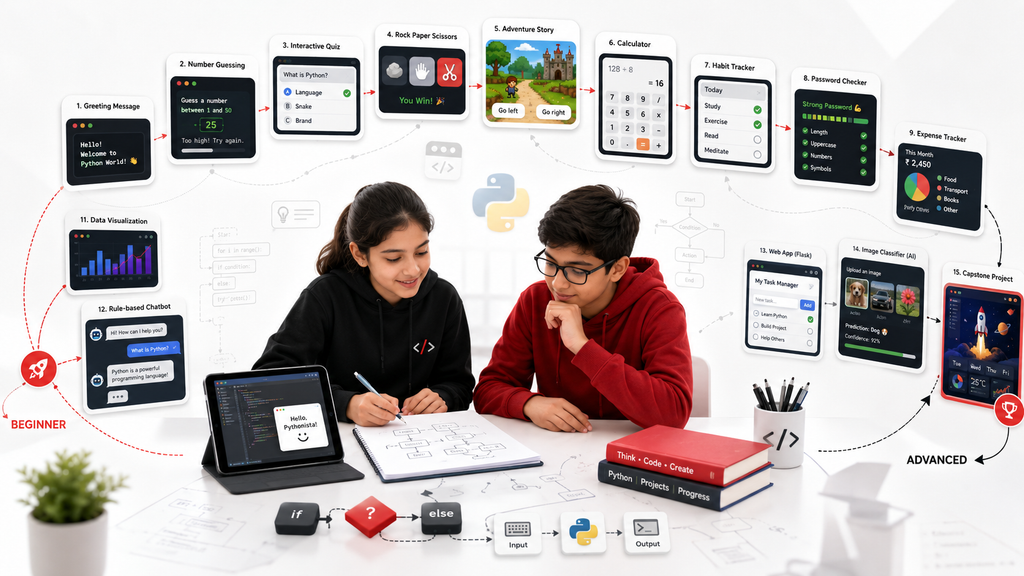
Why projects are the fastest way to make Python meaningful
A child can memorise what a variable is and still feel lost when asked to build something. Projects close that gap. They give every concept a job: a loop repeats a game round, a condition checks an answer, a list stores questions, and a function keeps a larger program organised.
The best Python projects for children are not necessarily the most technically impressive. They are projects with a clear result, manageable scope and room for the student to make decisions. A beginner should be able to understand the whole program. An advanced learner should be able to extend the project without replacing it with code copied from somewhere else.
The fifteen ideas below are arranged from beginner to advanced. Ages are only approximate. A confident younger learner may move faster, while an older beginner may start with the first projects. Each idea includes the main concepts, a sensible first version and an extension that encourages independent thinking.
1. Personalised greeting generator
Recommended level: first Python lesson.
The student asks the user for a name, favourite colour or hobby and then prints a personalised message. The program is simple, but it introduces input, output, strings and variables in a way that immediately responds to the learner.
A first version might say, “Hello, Aanya. A blue robot sounds like a great project.” The important teaching moment is that the computer does not understand the person; it stores text and combines it according to instructions.
Extension challenge: add several questions and choose different messages based on the answers. The student can also validate an empty response or format the name correctly.
Common mistake: adding numbers and text without converting types. This creates an early opportunity to explain strings and integers without turning the lesson into a definition list.
2. Number guessing game
Recommended level: beginner.
The computer chooses a secret number and the player keeps guessing until the answer is correct. This project introduces random values, loops, conditions and comparison operators. It also creates a natural reason to count attempts.
Start with a range from one to twenty. After each guess, tell the player whether the answer is too high or too low. End with a message showing the number of attempts.
Extension challenge: add difficulty levels, a maximum number of guesses or a replay option. An older learner can calculate a score based on the range and number of attempts.
Common mistake: generating a new secret number inside the loop. Ask the student to explain why the target must be created once before guessing begins.
3. Interactive quiz
Recommended level: beginner.
A quiz teaches lists, scoring, conditions and repeated input. Begin with five questions chosen by the student. A simple version stores each question and answer separately; a stronger version uses a list of dictionaries or tuples.
The student should decide how answers are compared. Will capitalisation matter? Should spelling variants be accepted? These small choices introduce the idea that software behaviour depends on explicit rules.
Extension challenge: randomise question order, show feedback after each answer, calculate a percentage and store the best score.
Common mistake: writing five nearly identical blocks instead of using a loop. Let the learner first notice the repetition, then refactor it. The improvement becomes meaningful because it solves a problem they can see.
4. Rock-paper-scissors
Recommended level: beginner.
This familiar game introduces random choice, conditions and repeated rounds. The user enters rock, paper or scissors while the computer selects one option. The program compares the choices and announces the result.
The logic is a useful challenge because there are draws and several winning combinations. Students can solve it with nested conditions, then discuss whether the code can be simplified.
Extension challenge: play best of five, track scores, reject invalid input and create a “computer strategy” that responds to previous choices.
Common mistake: accepting unexpected spellings or spaces. Input cleaning with .strip() and .lower() shows how real users behave differently from ideal test cases.
The project is small enough for beginners but rich enough to discuss design, fairness and testing.
5. Choose-your-own-adventure story
Recommended level: beginner to early intermediate.
A branching story helps students understand conditions as decisions. The player explores a castle, space station, school mystery or any setting the learner enjoys. Each choice changes what happens next.
Begin with three decision points and two possible endings. Plan the branches on paper before coding. This prevents the program from becoming a confusing sequence of nested statements.
Extension challenge: add inventory, health, points, random events or reusable scene functions. A student can also save the story path and display it at the end.
Common mistake: creating too many branches before testing. Teach the learner to finish one complete route, test it and then add another.
This project is especially useful for children who enjoy writing but may not initially identify as “technical.”
6. Calculator with a friendly menu
Recommended level: beginner to early intermediate.
A calculator introduces functions, numeric input, error handling and user menus. Instead of copying a standard example, ask the student to design a calculator for a purpose: homework checks, pocket-money planning, recipe quantities or game scores.
The first version supports addition, subtraction, multiplication and division. Each operation should be placed in a function. The menu repeats until the user chooses to exit.
Extension challenge: add percentages, averages, unit conversions or calculation history.
Common mistake: dividing by zero or entering text where a number is expected. These cases introduce try and except in a practical way.
The learning goal is not to compete with a phone calculator. It is to understand how a program receives instructions, chooses an operation and handles unexpected input.
7. Habit or study tracker
Recommended level: early intermediate.
A tracker gives data structures a real purpose. The learner records a habit, completion status or study minutes and then displays progress. A first version can store entries only while the program is running. A later version can save data to a file.
Students should design the fields themselves. Do they need a date, category, target and note? The discussion introduces the idea that software begins with understanding information.
Extension challenge: calculate streaks, weekly totals or completion percentages. Add a simple chart using a beginner-friendly library after the core logic works.
Common mistake: focusing on colours or interface before data works correctly. Teach the student to build the smallest usable version first.
Privacy note: use fictional or non-sensitive data during class and avoid collecting personal health details.
8. Password-strength checker
Recommended level: intermediate.
This project teaches string analysis, loops, conditions and responsible security messaging. The program checks length and the presence of uppercase letters, lowercase letters, numbers and symbols. It then explains which requirements are missing.
The lesson should make clear that a simple rule checker cannot guarantee that a password is secure. It evaluates visible characteristics, not whether the password is reused, exposed or predictable.
Extension challenge: detect common sequences, estimate strength categories and generate a passphrase using randomly selected words. Do not store or transmit real passwords.
Common mistake: asking classmates to enter actual account passwords. The teacher should explicitly prohibit this and use invented examples.
This project is valuable because it combines programming with digital-safety judgement.
9. Expense or pocket-money tracker
Recommended level: intermediate.
A student records income and expenses, assigns categories and calculates a remaining balance. The project uses lists or dictionaries, loops, functions and possibly file storage.
Begin with fictional data. The learner can add entries and view a summary by category. Ask what should happen if an expense is negative or if a category is misspelled.
Extension challenge: save entries in CSV or JSON, create monthly summaries and visualise spending with a bar chart. A teen can design a basic graphical or web interface after the data logic is stable.
Common mistake: mixing currency symbols with numeric values in calculations. Teach the student to store numbers separately and format them only when displaying output.
The project makes abstract data handling relevant while avoiding the complexity of a full finance application.
10. Weather dashboard using an API
Recommended level: intermediate.
An API allows one program to request information from another service. A weather dashboard can ask for a city, send a request and display temperature or conditions.
Before coding, explain that APIs have rules, limits and keys. Use a provider and account appropriate for the student’s age and the organisation’s privacy policy. Never publish a private API key inside public code.
Extension challenge: add a multi-day forecast, convert units, display weather icons or compare cities. The student can also handle errors such as an unknown location or unavailable service.
Common mistake: assuming every request will succeed. This project is a useful introduction to status codes, missing fields and graceful error messages.
The goal is to teach connection and data handling, not merely to copy a request snippet.
11. Data visualisation from a small dataset
Recommended level: intermediate.
Students can collect safe, non-sensitive data such as favourite books, daily temperatures, sports scores or public transport times and create charts. Python libraries make visualisation accessible, but the thinking should come first.
Ask the learner what question the chart should answer. A graph without a question can be colourful but meaningless. The student should choose an appropriate chart, label axes and explain what the result does and does not show.
Extension challenge: clean missing data, compare categories, calculate averages or build an interactive filter.
Common mistake: using a misleading scale or choosing a pie chart for too many categories. Discuss how design affects interpretation.
This project is an excellent bridge between programming, mathematics and critical data literacy.
12. Simple chatbot with rules
Recommended level: intermediate.
Before introducing large language models, build a rule-based chatbot. The user enters text and the program looks for keywords or menu choices to provide a response. This makes the limitations visible: the bot only responds to patterns the student has programmed.
Suitable themes include a study helper, museum guide, book recommender or fictional character. The student should include a fallback message when the input is not recognised.
Extension challenge: store responses in a dictionary, add conversation context or compare the rule-based system with a generative AI tool.
Common mistake: claiming the chatbot “understands.” Use the project to distinguish matching rules from human understanding and from machine-learning models.
This is a strong foundation for responsible AI discussion because students can see exactly where behaviour comes from.
13. Flask web application
Recommended level: intermediate to advanced.
A small Flask application helps students understand how Python can power a website. A useful first project is a quiz, to-do list, book tracker or project portfolio.
Begin with one route and one template. Add forms and data only after the basic request-response flow is understood. Students should learn that HTML controls the page structure while Python processes information on the server.
Extension challenge: add user-friendly validation, persistent storage and multiple pages. Authentication should be introduced carefully and not improvised for a public child project.
Common mistake: copying a complete application whose structure the student cannot explain. Build in stages and require a short architecture diagram.
The project is valuable because it connects programming logic with something parents and peers can use.
14. Image classifier experiment
Recommended level: advanced teenager with Python foundations.
The student uses a safe educational dataset or a carefully controlled set of non-personal images to train a simple classifier. The focus should be the complete process: defining classes, preparing data, training, testing, measuring errors and documenting limitations.
A good project might classify types of leaves, recyclable objects or simple drawings. Avoid sensitive categories involving identity, health or emotion.
Extension challenge: compare balanced and unbalanced datasets, create a confusion matrix and test images captured under different conditions.
Common mistake: reporting one accuracy number as proof that the model is reliable. Ask which examples failed and whether the test data resembles real use.
This project should always include a privacy and fairness review, not only technical results.
15. Independent capstone project
Recommended level: advanced.
The capstone is not one fixed project. The student identifies a problem, defines a realistic first version and chooses suitable tools. Examples include a school-event organiser, revision planner, community-resource directory, game, data dashboard or responsible AI experiment.
The project should begin with a one-page brief: user, problem, features, non-features, data, risks and timeline. The student then builds a minimum viable version, tests it with a small group and records feedback.
Extension challenge: improve accessibility, write documentation, add automated tests, deploy safely and present technical decisions.
Common mistake: choosing a project so large that nothing is finished. The teacher’s role is to reduce scope without taking away ownership.
A strong capstone proves more than code. It shows planning, persistence, communication and the ability to make responsible choices.
How to turn a project list into real learning
Do not ask a child to complete all fifteen projects quickly. Select one that fits the current level and interest. Let the learner personalise the theme, then require a short explanation of the logic. After the first version works, add one extension chosen by the student.
Use a simple review routine:
What problem does the project solve?
What input does it receive?
What output does it create?
Which part was most difficult?
What error taught you something?
What would you change for a real user?
Which code can you explain without notes?
Parents should value the development process, not only the polished result. A project with a few visible imperfections may represent more genuine learning than a flawless copied application.
Frequently asked questions
What Python version should children use? Use a current supported Python 3 release and a learning environment approved by the instructor.
Do beginners need to install software? Not always. Browser-based environments can reduce setup, although older students should eventually learn local development safely.
How much code should a beginner project contain? Only enough for the student to understand the complete program. Line count is not a learning objective.
Can students use AI to help with code? They can use approved tools transparently for explanation or debugging, but should verify outputs and be able to explain the final code.
Should projects be published online? Publish only with parent approval, secure settings and no personal information. Review API keys, accounts and data before sharing.
What makes a project portfolio strong? Variety, progression, original decisions, clear explanations and honest documentation of challenges.
Conclusion
Python becomes meaningful when children use it to make decisions and solve visible problems. The first greeting program may be small, but it teaches the same essential relationship found in larger software: information enters, instructions process it and an output appears.
Move gradually from short console projects to data, APIs, web applications and responsible machine learning. At every stage, keep the student in control of the idea. The most valuable project is not the one with the longest code or trendiest technology. It is the one the learner can explain, improve and proudly call their own.